Safety Permit Software FAQs | QHSEAlert
Safety Permit Software FAQs provide clear answers to the most common questions about digital permit to work systems used in high-risk industries. This section helps organizations understand how a safety permit software works, what problems it solves, and how it improves workplace safety and compliance through structured workflows.
This FAQ page is designed for HSE managers, safety officers, plant managers, site supervisors, and contractors who are responsible for ensuring safe execution of hazardous work activities. Whether you are managing daily operations or overseeing contractor safety, understanding the permit to work system is essential for reducing risks and maintaining compliance.
These FAQs are important because they simplify complex safety processes and support faster adoption of a digital PTW system. Many organizations still rely on paper-based permits, which can lead to delays, missing approvals, and audit challenges. Clear answers help teams transition smoothly to digital systems and improve overall safety performance.
QHSEAlert provides a modern HSE software solution that digitizes the entire permit to work process—from request and approval to execution and closure. This FAQ section is created to help users better understand how QHSEAlert’s safety permit software enhances control, transparency, and compliance across worksites.
Safety Permit Software FAQs - General
What is Safety Permit Software?
Safety Permit Software is a digital solution that automates and manages the entire Permit to Work (PTW) process. Instead of using paper forms, organizations can create, review, approve, monitor, and close work permits electronically through a centralized platform.
A digital permit to work system helps ensure that all required safety checks, risk assessments, approvals, and precautions are completed before hazardous work begins. It also maintains a complete audit trail, improves communication, and supports compliance with workplace safety regulations.
How does a Permit to Work system workflow in software?
A digital Permit to Work system follows a structured workflow that ensures every work permit is reviewed and approved before work starts.
A typical workflow includes:
- Risk assessment and hazard identification
- Selection of required safety precautions
- Multi-level approval by authorized personnel
- Permit issuance
- Work execution with monitoring
- Permit suspension
- Work completion
- Final inspection
- Permit closure and record storage
THE ENTIRE PROCESS OF WORKFLOW IS CUSTOMIZABLE AS PER THE CUSTOMER’S REQUIREMENTS. This workflow reduces manual errors and provides complete visibility throughout the permit lifecycle.
What types of permits can be managed using Safety Permit Software?
Most Safety Permit Software solutions support multiple types of work permits used across various industries.
Common permit types include:
- Hot Work Permit
- Cold Work Permit
- Confined Space Entry Permit
- Electrical Isolation Permit
- Lockout Tagout (LOTO) Permit
- Excavation Permit
- Work at Height Permit
- Lifting or Crane Permit
- Radiation Work Permit
- Line Breaking Permit
- Pressure Testing Permit
- Vehicle Entry Permit
- General Work Permit
THE CUSTOMERS CAN CONFIGURE THEIR OWN PERMIT TYPE/ CONTENT/ WORKFLOW/ CHECKLIST AND MANY MORE. Organizations can also create customized permit templates based on their operational requirements.
THE DEMO WILL HELP YOU TO UNDERSTAND BETTER. EVEN A TRIAL FOR THE EXISTING PERMIT HELPS YOU. SCHEDULE THE DEMO MEETING ONLINE
How does Safety Permit Software improve workplace safety?
Safety Permit Software ensures that hazardous work cannot begin until all required safety conditions are verified.
The software improves safety by:
- Standardizing permit procedures
- Identifying hazards before work starts
- Verifying control measures
- Managing simultaneous operations
- Tracking permit validity
- Improving communication
- Preventing unauthorized work
- Providing real-time visibility
These controls significantly reduce the likelihood of workplace incidents and improve operational safety.
Does Safety Permit Software support safety compliance and audits?
Yes. One of the major advantages of digital Permit to Work software is its ability to support compliance with regulatory and organizational requirements.
The software maintains:
- Complete audit trails
- Digital approval records
- Inspection history
- Safety checklists
- Risk assessments
- Permit attachments
- User activity logs
- Compliance reports
These records simplify internal audits, external inspections, and certification audits such as ISO 45001 and ISO 9001.
Why is digital Safety Permit Software better than a paper-based permit system?
A digital Permit to Work system provides greater efficiency, accuracy, and control compared to traditional paper permits.
Key advantages include:
- Faster approval process
- Real-time permit status tracking
- Improved communication between departments
- Automatic notifications and reminders
- Reduced paperwork
- Centralized document storage
- Complete audit trail
- Better compliance reporting
- Improved workplace safety
- Easier contractor management
Digital systems also minimize the risk of lost documents, incomplete permits, and unauthorized work.
Which industries can benefit from Safety Permit Software?
Safety Permit Software is suitable for any industry where hazardous work requires formal authorization and safety controls.
Industries include:
- Oil & Gas
- Construction
- Manufacturing
- Chemical & Petrochemical
- Mining
- Power Plants
- Cement Industry
- Pharmaceutical
- Food & Beverage
- Marine & Offshore
- Infrastructure & Utilities
- Warehousing & Logistics
Any organization that manages high-risk work activities can benefit from a digital permit system.
Safety Permit Software FAQs - Features & Functionalities
How does the approval workflow work in QHSEAlert Safety Permit Software?
QHSEAlert Safety Permit Software provides a configurable approval workflow that can match your organization’s safety procedures.
The workflow may include:
- Permit requester
- Area owner review
- Safety officer verification
- Maintenance approval
- Operations approval
- Final authorization
Each approval step is digitally recorded with the user’s name, date, time, and comments, ensuring accountability and traceability. THE ENTIRE WORKFLOW CAN BE CUSTOMIZED AS PER THE CUSTOMER’S REQUIREMENTS.
Can permit be customized?
Yes. Most organizations have unique operational risks and permit requirements, so Safety Permit Software typically allows full customization.
Organizations can configure:
- Permit formats
- Approval workflows
- Safety checklists
- Mandatory fields
- Risk assessment forms
- Isolation requirements
- PPE requirements
- Industry-specific permits
Customization ensures the software aligns with company policies and regulatory obligations.
Can Safety Permit Software be accessed on mobile devices?
Yes. Most modern Safety Permit Software solutions are designed to work on smartphones, tablets, and desktop computers.
Mobile access allows supervisors, engineers, contractors, and safety officers to:
- Raise permits
- Review permit requests
- Approve permits remotely
- Upload photographs
- Conduct inspections
- Receive notifications
- Close permits from the field
This enables faster decision-making and improves productivity at remote work locations.
Can Safety Permit Software integrate with other business systems?
Yes. Many digital Permit to Work solutions can integrate with existing business applications.
Common integrations include:
- Email services
- Google Signin
- Active Directory
- Single Sign-On (SSO)
Integration reduces duplicate data entry and improves operational efficiency.
How secure is Safety Permit Software?
Data security is a critical feature of modern Safety Permit Software.
Security features commonly include:
- Role-based user access
- Password-protected accounts
- Secure cloud hosting
- Data encryption
- Automatic backups
- Activity logs
- Multi-level authentication
- Permission management
These features help protect sensitive operational and safety information from unauthorized access.
Can fields or sections become editable or non-editable based on the approval workflow?
Yes. The software supports workflow-based field control. Specific sections or fields can automatically become editable or read-only depending on the current approval stage, user role, or workflow status. This helps maintain data integrity throughout the permit lifecycle.
Can it be confirmed that the Safety Permit has been verified and approved on-site?
Yes. The software provides digital verification records showing that the permit has been reviewed, inspected, and approved at the worksite. Verification can include digital signatures, timestamps, GPS location (if enabled), photographs, and user identification for complete traceability.
Can a Safety Permit be temporarily suspended during ongoing work?
Yes. Authorized users can suspend an active Safety Permit whenever unsafe conditions, weather changes, operational issues, or emergency situations require work to stop temporarily. The permit can later be resumed after the necessary approvals and safety checks.
Can a Safety Permit validity be extended beyond the original duration?
Yes. The software allows authorized users to extend the validity of a Safety Permit when additional work time is required. Extensions follow your organization’s approval workflow to ensure continued compliance and safety.
Can an approved Safety Permit be withdrawn or revoked?
Yes. QHSEAlert Safety Permit Software allows authorized personnel to withdraw or revoke approved permits whenever work conditions change, safety concerns arise, or operational requirements demand immediate action. All actions are recorded in the audit trail for complete accountability.
Can instant cancellation of a Safety Permit be performed during emergencies?
Yes. Authorized personnel can immediately cancel an active Safety Permit whenever emergency conditions arise. The software records the reason, user details, date, and time of cancellation, ensuring complete traceability and supporting emergency response procedures.
Which industries can benefit from Safety Permit Software?
Safety Permit Software is suitable for any industry where hazardous work requires formal authorization and safety controls.
Industries include:
- Oil & Gas
- Construction
- Manufacturing
- Chemical & Petrochemical
- Mining
- Power Plants
- Cement Industry
- Pharmaceutical
- Food & Beverage
- Marine & Offshore
- Infrastructure & Utilities
- Warehousing & Logistics
Any organization that manages high-risk work activities can benefit from a digital permit system.
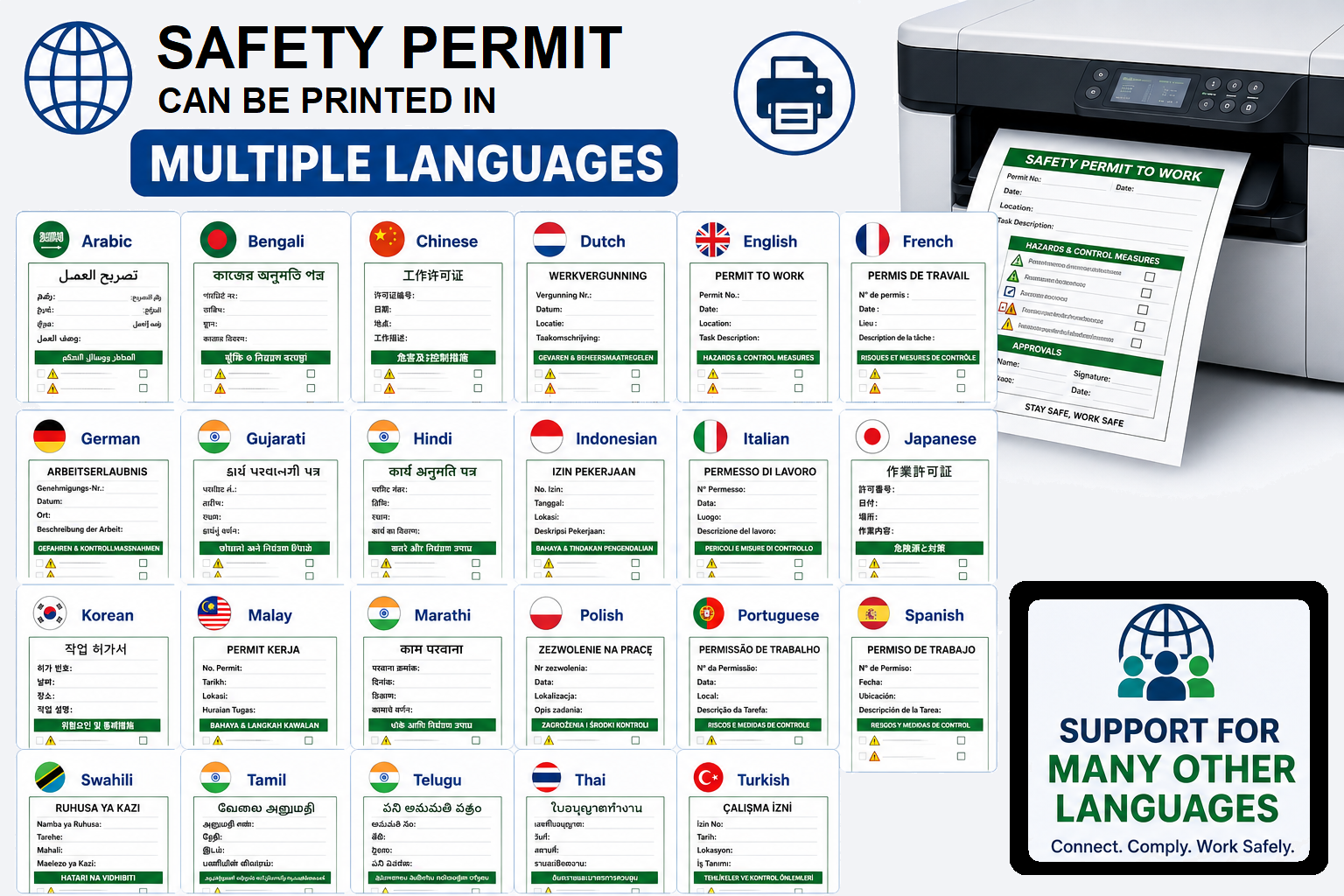
Can Safety Permits be printed in languages other than English?
Yes. QHSEAlert Safety Permit Software supports multilingual permit printing, allowing organizations to generate permits in the language most suitable for their workforce.
Arabic – Bengali – Chiense – Dutch – English – French – German – Gujarati – Hindi – Indonesian – Italian – Japanese – Korean – Malay – Marathi – Persian (Farsi) – Polish – Portuguese – Russian – Spanish – Swahili – Tamil – Telugu – Thai – Turkish – Ukrainian – Urdu – Vietnamese – Others as well
But the language must be configured at the initial setup only. If the permit is set in English and Arabic, it can be printed in English and Arabic.
Safety Permit Software FAQs - Permit Configuration & Customization
Can the gas measurement criteria changed? (it means addition or deletion)
Yes. QHSEAlert Safety Permit Software allows you to add, modify, or remove gas measurement parameters based on your organization’s procedures and regulatory requirements. You can configure gas testing criteria for different work permits, confined spaces, or operational areas without changing the core application.
Can a customized Hazard and Risk Library be created for specific areas, equipment, and activities?
Yes. You can develop and maintain a customized Hazard and Risk Library that is specific to your plant, operational areas, equipment, machines, or processes. This improves the accuracy and consistency of risk assessments during permit creation.
Can the Risk Assessment form be configured in the Safety Permit Software?
Yes. The Risk Assessment form is fully customizable. Organizations can add, remove, or modify assessment sections, questions, checklists, and control measures to align with their internal safety procedures and operational requirements.
Can the Risk Assessment criteria be customized in the Safety Permit Software?
Yes. The software allows you to define your organization’s own Risk Assessment methodology, including likelihood, severity, consequence ratings, risk matrix, acceptance criteria, and risk categories. This ensures consistency with your corporate HSE standards.
Can the hazards list be configured in the Safety Permit Software?
Yes. The hazard library is fully configurable. Organizations can add, edit, or remove hazards to reflect their operational risks, industry requirements, and workplace conditions.
Can the tools and equipment list be configured in the Safety Permit Software?
Yes. Administrators can create and maintain customized lists of tools, machinery, testing instruments, lifting equipment, and other resources that are relevant to the organization’s operations.
Can the Personal Protective Equipment (PPE) list be configured in the Safety Permit Software?
Yes. The PPE library can be customized to include organization-specific protective equipment such as helmets, gloves, respiratory protection, fall protection equipment, chemical suits, face shields, hearing protection, and more.
Can the safety equipment list be configured in the Safety Permit Software?
Yes. The software allows you to configure safety equipment lists, including gas detectors, fire extinguishers, rescue equipment, spill kits, barricades, emergency showers, breathing apparatus, and other safety resources required for different work permits.
Is it possible to record the gas measurement data periodically after the safety permit is approved and work is executed?
Yes. QHSEAlert Safety Permit Software allows authorized users to record additional gas measurement readings even after the permit has received principal approval and is active. This supports periodic gas testing during work execution and helps maintain continuous safety monitoring.
Can organizations create their own permit types, workflows, and checklists?
Yes. QHSEAlert Safety Permit Software allows admin to create own permit type, workflow setup and checklist as per the permit-wise. It is one time configuration.
Safety Permit Software FAQs - Contractor Management
There are number of contractors working under various functions like mechanical or electrical. Is it possible to control the contractor function wise?
Yes. The software enables function-wise contractor management. Contractors can be categorized based on their work disciplines, such as Mechanical, Electrical, Civil, Instrumentation, Operations, or other departments. Access, permit types, and approval workflows can be controlled according to their assigned function.
It means that you are not allowed to issue the mechanical work safety permit to other contractors.
Is it possible to issue the safety permit to the contractor with the limited number of people, as per the legal licence obtained for the number of people?
Yes. QHSEAlert Safety Permit Software allows you to define the maximum number of workers permitted as the contractor licence obtained for the regulatory authority. This helps organizations comply with statutory requirements, site-specific rules, and internal safety policies by preventing permits from exceeding the approved workforce limit.
Can contractor performance be monitored through the software?
Yes. QHSEAlert Safety Permit Software enables organizations to monitor contractor performance through real-time permit activities, compliance records, permit approval timelines, and non-compliance tracking. Configurable reports and dashboards help evaluate contractor safety performance, accountability, and overall work efficiency.
Safety Permit Software FAQs - Documents & File Management
What types of files can be uploaded to the Safety Permit Software?
The software supports a wide range of commonly used file formats, including:
- PDF documents
- Microsoft Word documents
- Microsoft Excel spreadsheets
- PowerPoint presentations
- JPEG, PNG, and other image files
- Other supported document formats based on your implementation
This enables users to attach procedures, drawings, photographs, certificates, and supporting documents to permits.
What is the maximum file size allowed for uploads?
The maximum upload file size is configurable according to your organization’s hosting environment, storage capacity, and system settings. This allows administrators to balance document requirements with overall system performance.
Can photographs and supporting documents be attached to permits?
Yes. Users can attach photographs, documents, permits, certificates, and other supporting files to Safety Permits, providing complete documentation for verification, compliance, and future audits.
Safety Permit Software FAQs - Reports & Analytics
Can summary reports of Toolbox Talks be generated for safety audits?
Yes. QHSEAlert Safety Permit Software provides comprehensive Toolbox Talk summaries, including attendance records, discussion topics, identified hazards, safety instructions, participant acknowledgements, and historical reports for audits and compliance.
What reports are available in Safety Permit Software?
QHSEAlert Safety Permit Software provides a wide range of reports, including Permit Status Reports, Area-wise Reports, Contractor Performance Reports, Toolbox Talk Reports, Non-Compliance Reports, and real-time dashboards. Reports can be filtered and exported to support safety monitoring, compliance, and management decision-making.
Can reports be exported to Excel or PDF?
Yes. Data can be exported to Microsoft Excel for further analysis, and reports can be downloaded in PDF format for sharing, record-keeping, and audit purposes.
Safety Permit Software FAQs - Implementation & Training
How long does it take to implement Safety Permit Software?
Implementation time varies depending on the organization’s size and configuration requirements.
A cloud-based solution can often be deployed within a few days or weeks, while larger enterprises requiring workflow customization, data migration, and system integrations may need additional implementation time.
A structured implementation plan that includes configuration, user training, testing, and deployment helps ensure a smooth transition from paper-based permits to a digital Permit to Work system.
Is training required to use Safety Permit Software?
Most modern Safety Permit Software solutions are designed with user-friendly interfaces that require minimal training.
Users typically learn to:
- Create permit requests
- Review permit details
- Approve permits
- Upload supporting documents
- Monitor permit status
- Close completed permits
Organizations usually conduct short onboarding sessions to ensure consistent use across all departments.
What implementation support does QHSEAlert provide?
QHSEAlert provides comprehensive implementation support, including system configuration, workflow setup, user training, and go-live assistance to ensure a smooth and successful deployment of the Safety Permit Software.
Is data migration available?
No. Currently, QHSEAlert Safety Permit Software does not support data migration from existing systems. New permit records and configurations are created directly within the software during implementation.
Safety Permit Software FAQs - Licensing & Pricing
How much does Safety Permit Software cost?
The cost of QHSEAlert Safety Permit Software is tailored to each organization, ensuring you pay only for the features and services your business requires.
The first-year investment depends on several factors, including:
- Number of sites to be implemented
- Domain name selection (including premium domain options, if required)
- Cloud hosting capacity based on users and data storage
- On-site implementation and site visits
- Review and analysis of your existing Permit to Work (PTW) procedures
- Software customization to match your organization’s workflow
- Development of customized permit templates and checklists
- User training for administrators, approvers, and end users
- Data migration (if applicable)
- Integration with existing business or HSE systems (if required)
- Go-live support and implementation assistance
Since every organization has unique operational processes and compliance requirements, the first-year cost is determined after understanding your specific needs and implementation scope.
From the second year onward, pricing becomes simple and predictable. QHSEAlert charges a fixed annual subscription fee per site, which includes continued use of the software, technical support, software updates, maintenance, and cloud hosting (as per the subscribed plan).
This pricing model enables organizations to budget confidently while expanding the Safety Permit Software across multiple sites as their business grows. To receive a detailed quotation, contact the QHSEAlert team with your requirements, number of sites, and expected implementation scope.
Does QHSEAlert offer unlimited users?
Yes. QHSEAlert Safety Permit Software supports unlimited users, allowing organizations to add employees, contractors, supervisors, and administrators without user-based licensing restrictions.
Is pricing based on the number of users or sites?
No. Pricing is not based on the number of users or sites. Please contact the QHSEAlert team for a customized quotation based on your organization’s specific requirements.
Is there an annual subscription?
Yes. QHSEAlert Safety Permit Software is available on an annual subscription basis, which includes software usage, ongoing support, and regular updates as per the selected plan.
Safety Permit Software FAQs - Security & Access Control
How secure is Safety Permit Software?
Yes, it is secured. Because users are unlimited, hence the login creditials are not required to share with each others. Login with Captcha and Two-Factor Authetification can be set. The password strengh is also applicable and after certain period, the user will be asked to change the password too. The files uploaded by the users are encrypted.
Does the software support role-based access?
Yes, users are assigned roles like admin, approver, issuer, or viewer. Each role has defined permissions to ensure controlled access to functions and data.
Is data backed up automatically?
Yes, most systems perform automatic backups at regular intervals. This ensures data recovery in case of system failure or accidental loss.
Does the software support Single Sign-On (SSO)?
Safety Permit Software FAQs - Mobile & Field Operations
Can Safety Permit Software be accessed on mobile devices?
Yes, most Safety Permit Software is mobile-friendly and accessible via apps or web browsers. Users can log in from smartphones and tablets for on-site usage.
Can site photographs be uploaded from mobile devices?
Can permits be approved from a mobile phone?
Yes, permits can be reviewed and approved directly from a mobile phone. Approvers can take real-time decisions even while off-site.
Safety Permit Software FAQs - Technical Support
How can I contact the QHSEAlert development team?
You can contact the QHSEAlert development and support team through ticket option. Our experts are available to assist with product demonstrations, customization requests, technical support, system enhancements, integrations, and implementation guidance.
What technical support options are available?
Technical support is usually available via email, phone, and online helpdesk/ticket system. Some providers also offer live chat and dedicated account managers for enterprise users.
How are software updates delivered?
Software updates are delivered automatically through cloud-based deployments or scheduled releases. Users typically receive new features, security patches, and improvements without manual installation. The customer is updated when updates are made available.
Can remote support be provided?
QHSE Digital Solutions