

Safety Observation Management Software
QHSEalert Safety Observation Management Software helps organizations digitally report, manage, track, and analyse workplace safety observations. Employees, supervisors, safety officers, and managers can record unsafe acts, unsafe conditions, hazards, positive safety observations, and near misses, attach photographs, assign corrective actions, monitor action status, and track observations through to closure.
With mobile access, configurable workflows, alerts, dashboards, analytics, and reports, QHSEalert provides a centralized digital safety observation management system for improving workplace safety and corrective action follow-up.
What Is Safety Observation Management Software?
Safety Observation Management Software is a digital system used to record, manage, track, and analyse safety observations identified during routine work activities.
Instead of maintaining observations in paper registers, Excel sheets, emails, or separate files, the organization can maintain observations in one centralized system.
A typical observation may include:
- Observation date and time
- Location / department / work area
- Observer name
- Type of observation
- Unsafe act or unsafe condition
- Positive safety behaviour
- Hazard category
- Risk or severity level
- Description of the observation
- Photograph or supporting evidence
- Immediate action taken
- Responsible person
- Target completion date
- Corrective or preventive action
- Review and approval
- Closure status
- Effectiveness verification
This creates a complete digital record from observation reporting to corrective action closure.
Why Use a Digital Safety Observation Management System?
Traditional safety observation systems often depend on paper forms, spreadsheets, emails, or manual registers. These methods can make it difficult to identify overdue actions, analyse recurring hazards, and maintain a consistent record across departments and locations.
A digital safety observation reporting system provides a centralized workflow for capturing observations and following them through to closure.
The objective is not simply to collect more observations. It is to convert observations into visible, assigned, tracked, and closed safety actions.
With QHSEalert, organizations can:
- Report safety observations digitally
- Capture observations from mobile devices
- Attach photographs and documents
- Categorize observations
- Assign responsibility for corrective action
- Set target completion dates
- Send alerts and notifications
- Monitor open and closed observations
- Analyse recurring hazards
- Track department-wise performance
- Generate reports
- Maintain historical records
- Support audit and management review activities
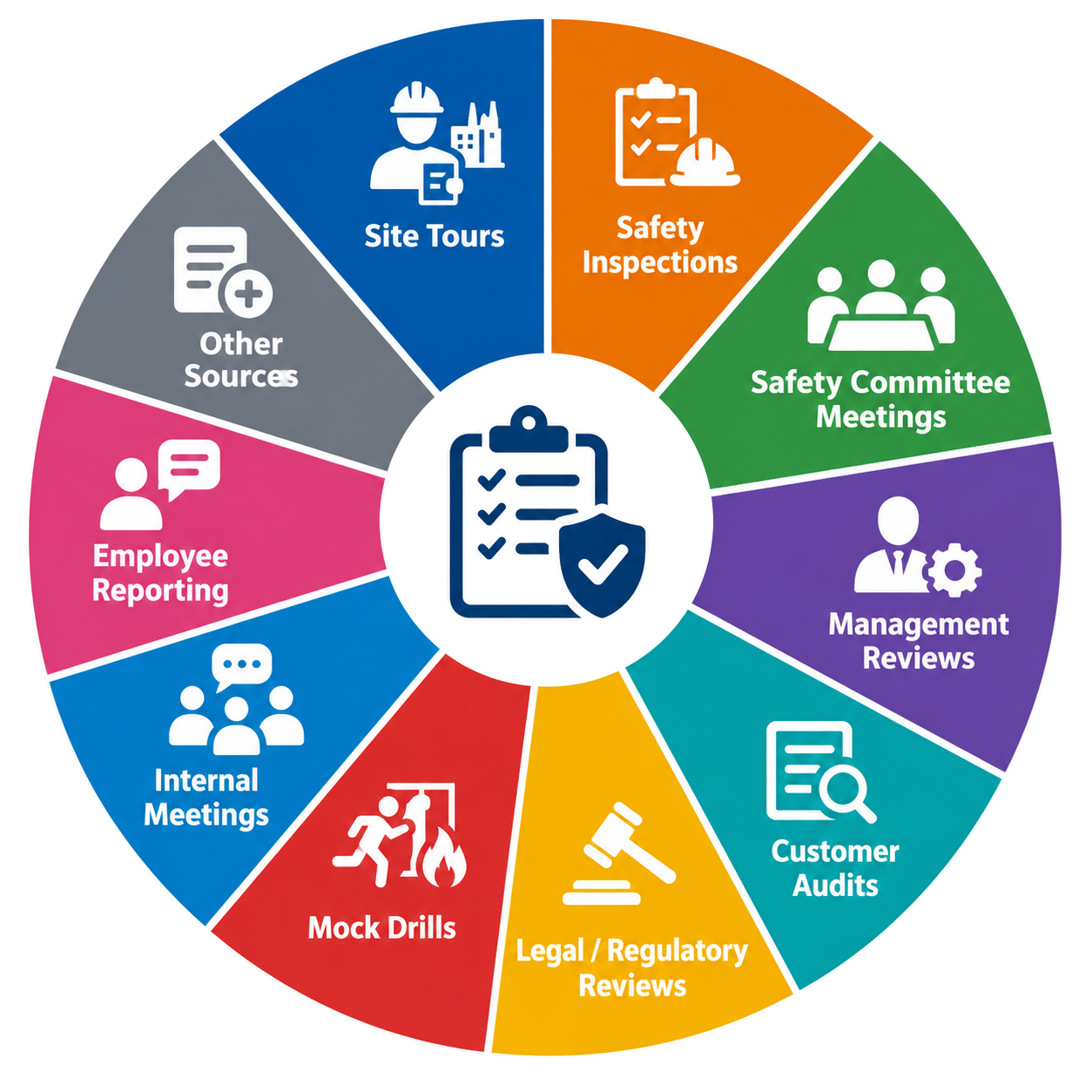
Sources of Safety Observations
Site Tours
Capture hazards and improvement opportunities identified during workplace rounds.
Safety Inspections
Record observations generated during planned or unplanned safety inspections.
Safety Committee Meetings
Track safety concerns and actions identified during committee discussions.
Management Reviews
Record safety improvement actions resulting from management review.
Customer Audits
Capture observations raised during customer or client audits.
Legal / Regulatory Reviews
Track safety-related observations resulting from legal or regulatory requirements.
Mock Drills
Record observations identified during emergency preparedness and mock-drill activities.
Internal Meetings
Convert safety concerns discussed during meetings into trackable actions.
Employee Reporting
Allow employees and other authorized users to report workplace safety observations.
Other Sources
Configure additional observation sources according to your organization’s requirements.
Types of Safety Observations You Can Manage
Unsafe Act Observations
- Incorrect PPE use
- Unsafe operating practices
- Failure to follow procedures
- Unsafe lifting practices
- Improper material handling
- Working without required authorization
Unsafe Condition Observations
- Poor housekeeping
- Damaged equipment
- Unsafe access
- Electrical hazards
- Inadequate barricading
- Unsafe storage
- Spillages
- Inadequate signage
What are Challenges with paper-based Safety Observation Program?
⏱️ Delayed Safety Observation Reporting
Paper forms can delay Safety Observation Reporting, making it difficult to capture hazards and unsafe conditions promptly.
🔧 Difficult Corrective Action Tracking
Manual records make Safety Observation Tracking difficult, especially when monitoring responsible persons, target dates, pending actions, and closures.
👁️ Limited Safety Data Visibility
Paper records provide limited visibility into recurring hazards, departments, locations, severity levels, and overall EHS Observation Management performance.
📊 Time-Consuming Trend Analysis
Analysing paper records requires manual compilation, making Safety Observation Analysis slower and increasing the possibility of errors.
📁 Risk of Lost Records
Physical documents can be misplaced, damaged, or difficult to retrieve, affecting the availability of historical Safety Observation Records.
👤 Poor Accountability
Paper-based processes can make responsibility unclear, weakening Safety Observation Corrective Action follow-up and timely closure.
🌐 Difficult Multi-Site Management
Managing paper observations across multiple locations makes centralized Safety Observation Management difficult and limits consistent monitoring.
📱 Limited Real-Time Monitoring
Paper registers cannot provide real-time dashboards, alerts, or notifications, limiting effective Digital Safety Observation Management.
🗂️ Increased Administrative Work
Manual data entry, filing, searching, and reporting increase administrative workload and reduce the time available for proactive Safety Management activities.
Why Organizations Need Digital Safety Observation Management Software?
🔍 Identify Workplace Hazards
📱 Simplify Safety Observation Reporting
⚡ Enable Faster Reporting
🎯 Improve Corrective Action Tracking
📊 Monitor Safety Performance
📈 Analyse Safety Observation Trends
🚨 Identify Recurring Risks
👥 Increase Employee Participation
✅ Strengthen Safety Accountability
🔄 Improve Action Follow-Up
🏢 Manage Multiple Locations
📋 Standardize Observation Processes
🔔 Receive Timely Alerts
🗂️ Centralize Safety Records
📸 Capture Evidence Digitally
📍 Track Location-Based Observations
🛡️ Support Proactive Risk Management
📝 Improve Audit Readiness
💡 Support Data-Driven Decisions
🚀 Build a Stronger Safety Culture
How Does Safety Observation Management Software Work?
1. Observe
An employee, supervisor, safety officer, contractor, or manager identifies a safety condition, behaviour, hazard, positive practice, or improvement opportunity.
2. Record
The user records the observation using the web application or mobile application and can add photographs or supporting evidence.
3. Categorize
The observation is classified according to the organization’s configured categories, departments, locations, risk levels, or observation types.
4. Review
The responsible safety professional or designated reviewer evaluates the observation and determines the required action.

5. Assign Action
Corrective or preventive action is assigned to the responsible person with a target completion date.
6. Track
The system monitors the action status and sends notifications or alerts where required.
7. Verify & Close
The completed action can be reviewed, supporting evidence can be attached, and the observation can be closed according to the organization’s workflow.
8. Analyze
Management can analyse observation trends, recurring hazards, departments, locations, categories, severity levels, and action status through reports and dashboards.
Corrective Action Management for Safety Observations
Reporting an observation is only the first step.
The real value comes from ensuring that the identified issue is assigned, corrected, verified, and closed.
Each action can be linked to the original observation so that the organization maintains traceability between the identified issue and the action taken.
This helps safety teams monitor open actions and focus attention on overdue or high-priority issues.
QHSEalert supports a structured corrective action process:
Observation → Review → Action Assignment → Target Date → Follow-up → Evidence → Verification → Closure

Key Features of Safety Observation Management Software
Digital Safety Observation Reporting
Users can record observations digitally instead of maintaining paper-based observation forms or spreadsheets.
Mobile Safety Observation Reporting
Users can access the system from mobile devices to report, review, and manage observations while working at the site.
Customizable Observation Forms
Configure observation fields, categories, classifications, workflows, and other information according to your organization’s safety process.
Photo & File Attachment
Attach photographs and supporting documents to provide evidence of the observed condition or completed corrective action.
Corrective Action Tracking
Assign corrective and preventive actions to responsible persons and monitor progress until completion.
Action Due-Date Monitoring
Track target completion dates and identify actions that are pending or overdue.
Automated Alerts & Notifications
Notify relevant users when observations are submitted, assigned, updated, reviewed, or require action.
Root Cause Analysis
Where required, analyse underlying causes and record actions designed to prevent recurrence.
Risk / Severity Classification
Classify observations according to the organization’s defined risk or severity categories.
Observation Status Management
Track observations through configurable workflow stages such as open, under review, action assigned, completed, verified, and closed.
Search & Filter
Quickly find observations using filters such as date, department, location, category, status, severity, responsible person, or other configured fields.
Benefits of Safety Observation Management Software
⚡ Faster Safety Reporting
Digital reporting allows observations to be submitted without waiting for paper forms or manual data entry.
👁️ Better Visibility of Workplace Risks
Centralized observation data gives safety teams greater visibility into recurring hazards and unsafe conditions.
🔧 Improved Corrective Action Tracking
Every observation can be connected to an assigned action and target date.
👤 Increased Accountability
Assigning actions to responsible persons makes ownership and follow-up more transparent.
👥 Better Employee Participation
A simple digital reporting process can make it easier for employees and supervisors to participate in workplace safety programs.
📄 Reduced Paperwork
Digital records reduce dependence on paper registers and manual filing.
📊 Improved Safety Data Analysis
Structured observation data makes it easier to identify trends and recurring safety issues.
📋 Better Audit Readiness
Centralized records, action history, evidence, reports, and traceability can support internal and external audit activities.
🔄 Continuous Improvement
Historical observation data can be used to identify improvement opportunities and monitor the effectiveness of safety initiatives.
Who Can Use Safety Observation Management Software?

- EHS / HSE Managers
- Safety Officers
- QHSE Managers
- Plant Managers
- Department Heads
- Supervisors
- Employees
- Contractors
- Safety Committee Members
- Management
- Internal Auditors
- Compliance Teams
Industries That Can Use Safety Observation Software

✔ Oil & Gas
✔ Construction
✔ Manufacturing
✔ Chemical & Petrochemical
✔ Mining
✔ Power & Utilities
✔ Cement Industry
✔ Pharmaceutical
✔ Food & Beverage
✔ Marine & Offshore
✔ Infrastructure & Utilities
Safety Observation Software vs Manual Reporting
| Manual / Excel-Based System | Digital Safety Observation Management |
|---|---|
| Paper forms or spreadsheets | Centralized digital system |
| Manual data entry | Digital observation capture |
| Difficult to track overdue actions | Action status and due-date tracking |
| Limited real-time visibility | Dashboard and real-time status |
| Difficult trend analysis | Structured analytics |
| Documents stored separately | Observation with photo/file evidence |
| Manual communication | Alerts and notifications |
| Difficult multi-site management | Centralized multi-location management |
| Limited traceability | Workflow and activity history |
| Time-consuming reporting | Searchable reports and exports |
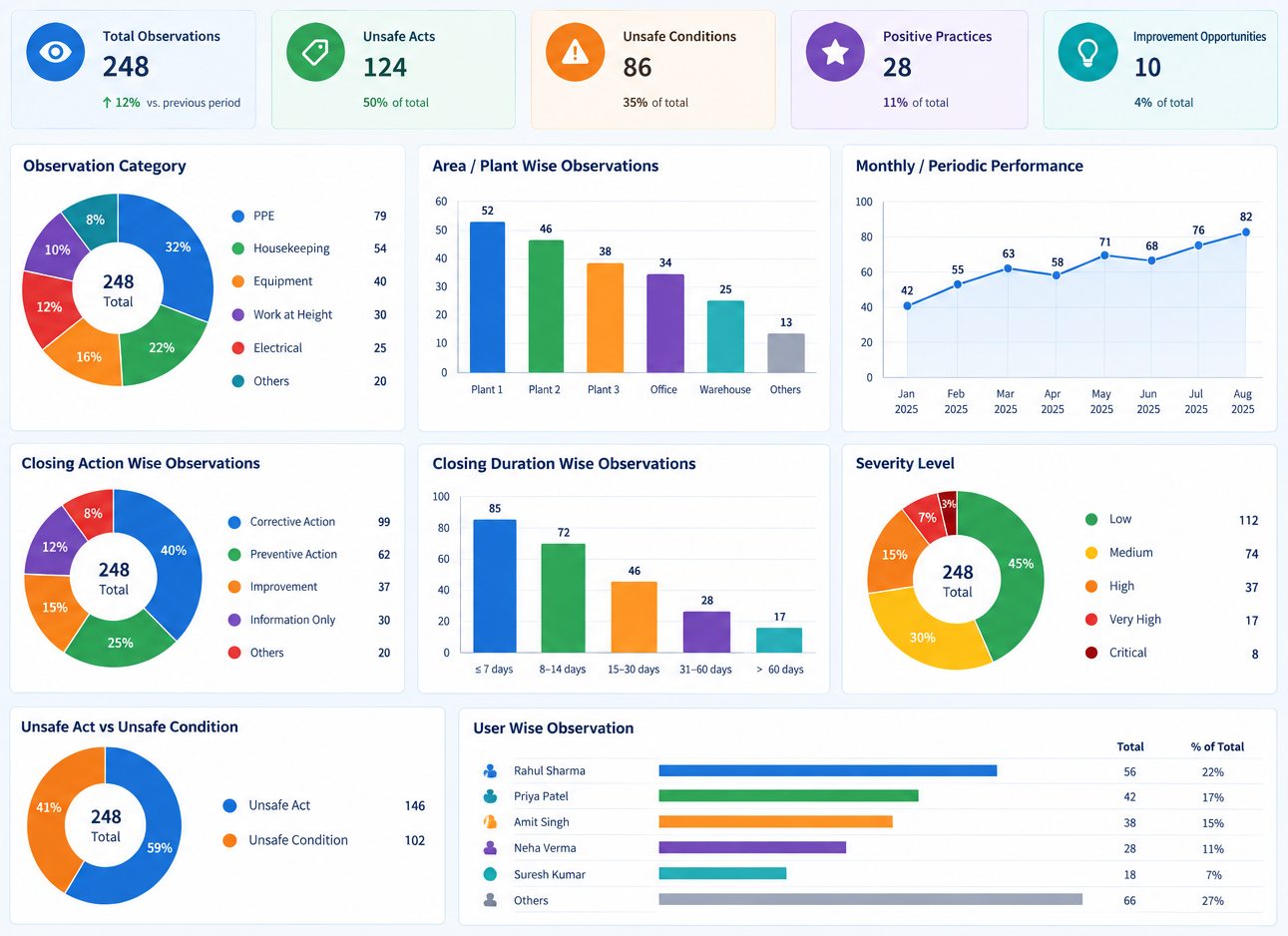
Safety Observation Dashboard & Analytics
A safety observation management system becomes more valuable when observation data can be converted into actionable information.
The QHSEalert dashboard can provide management visibility into areas such as:
- Total observations
- Observation category
- Area / plant-wise observations
- Monthly or periodic performance
- Closing action-wise observations
- Closing duration-wise observations
- User-wise observations
- Severity level
- Unsafe act vs. unsafe condition
Implementation & Support
⚙️ Configuration
Configure observation categories, forms, workflows, users, departments, locations, and other requirements.
👥 User Mapping
Map users according to their responsibilities for reporting, reviewing, assigning, approving, and closing observations.
🎓 Training
Provide user training so employees, supervisors, and administrators can effectively use the system.
📖 User Manual
Provide guidance for users and administrators.
💻 Demo Environment
Provide a demonstration environment to familiarize users with the system.
🛠️ Post-Implementation Support
Support users after implementation through the available support mechanism.
Why To Choose QHSEalert Safety Observation Management Software
📱 Mobile Safety Observation Reporting
Safety Observation Software enables users to report workplace observations from mobile devices, reducing dependence on paper forms and improving timely hazard reporting.
⚙️ Customizable Observation Forms
Safety Observation Management Software supports customizable forms, categories, workflows, departments, locations, and reporting requirements.
📸 Photo and Document Evidence
Digital Safety Observation Management allows users to attach photographs and supporting documents, providing clear evidence of workplace conditions and corrective actions.
🎯 Corrective Action Tracking
Safety Observation Tracking Software connects observations with responsible persons, target dates, corrective actions, and closure, improving accountability and follow-up.
🔔 Alerts and Notifications
Safety Observation Management Software provides alerts and escalate notifications for submitted observations, assigned actions, updates, reviews, and pending activities.
📊 Safety Observation Dashboard
Safety Observation Analytics provides management visibility into observation categories, departments, locations, severity, action status, and recurring workplace safety issues.
🔄 Complete Observation Workflow
Safety Observation Management System supports observation reporting, review, action assignment, follow-up, evidence, verification, closure, and analysis within one workflow.
🔍 Advanced Search and Filters
Safety Observation Software helps users quickly find records using filters such as date, department, location, category, severity, status, and responsible person.
👥 Multi-User Access
EHS Observation Management Software supports employees, supervisors, safety officers, managers, contractors, auditors, and other authorized users with defined responsibilities.
🏢 Multi-Location Management
Safety Observation Management Software helps organizations manage observations across multiple departments, work areas, locations, and sites from a centralized platform.
📈 Data-Driven Safety Improvement
Safety Observation Analytics Software converts observation data into useful trends, helping organizations identify recurring hazards and prioritize safety improvements.
🛡️ Improved Workplace Safety
QHSEalert Safety Observation Software supports proactive safety management by helping organizations identify unsafe acts, unsafe conditions, hazards, and positive practices.
📋 Better Audit Readiness
Digital Safety Observation Software maintains observation records, action history, evidence, and traceability to support audits and management review activities.
☁️ Cloud-Based Safety Management
QHSEalert provides Cloud-Based Safety Observation Software, allowing organizations to manage observations through a centralized web-based application.
🔐 Secure Data Management
Safety Observation Management Software supports role-based access, audit trails, backups, two-factor authentication, password policies, and secure cloud hosting.
📄 Reports and Data Export
Safety Observation Reporting Software provides reports and data export capabilities, helping management review safety performance and maintain required records for audit compliances.
🚀 Implementation and Support
QHSEalert provides Safety Observation Software Implementation and Support, including configuration, user mapping, training, user guidance, demonstration, and post-implementation support.
🔧 Configurable Workflow Management
Safety Observation Workflow Software can be configured according to observation categories, responsibilities, approval requirements, departments, locations, and organizational processes.
QHSEalert Safety Observation Management Software - Software Technical
| ATTRIBUTE | DETAILS |
|---|---|
| Software Name | QHSEAlert EHS Module |
| Category | Safety Observation Software |
| Software Type | Cloud-Based (SaaS) |
| Deployment | Web-Based Application |
| Primary Purpose | Digital Reporting, Followup, Closing & Analysis of Safety Observations |
| Mobile Access | Yes |
| Paperless Workflow | Yes |
| Unlimited Users | Yes |
| Unlimited Observations | Yes |
| Custom BBS Category | Yes |
| Approval Workflow | Configurable Multi-Level Workflow |
| Audit Trail | Complete Digital Audit Trail |
| Real-Time Dashboard | Yes |
| Reports & Analytics | Yes |
| Contractor Management | Yes |
| Photo & Document Attachments | Yes |
| Role-Based Access Control | Yes |
| Industry Support | Multiple Industries |
QHSEalert Safety Observation Management Software - Security & Data Privacy
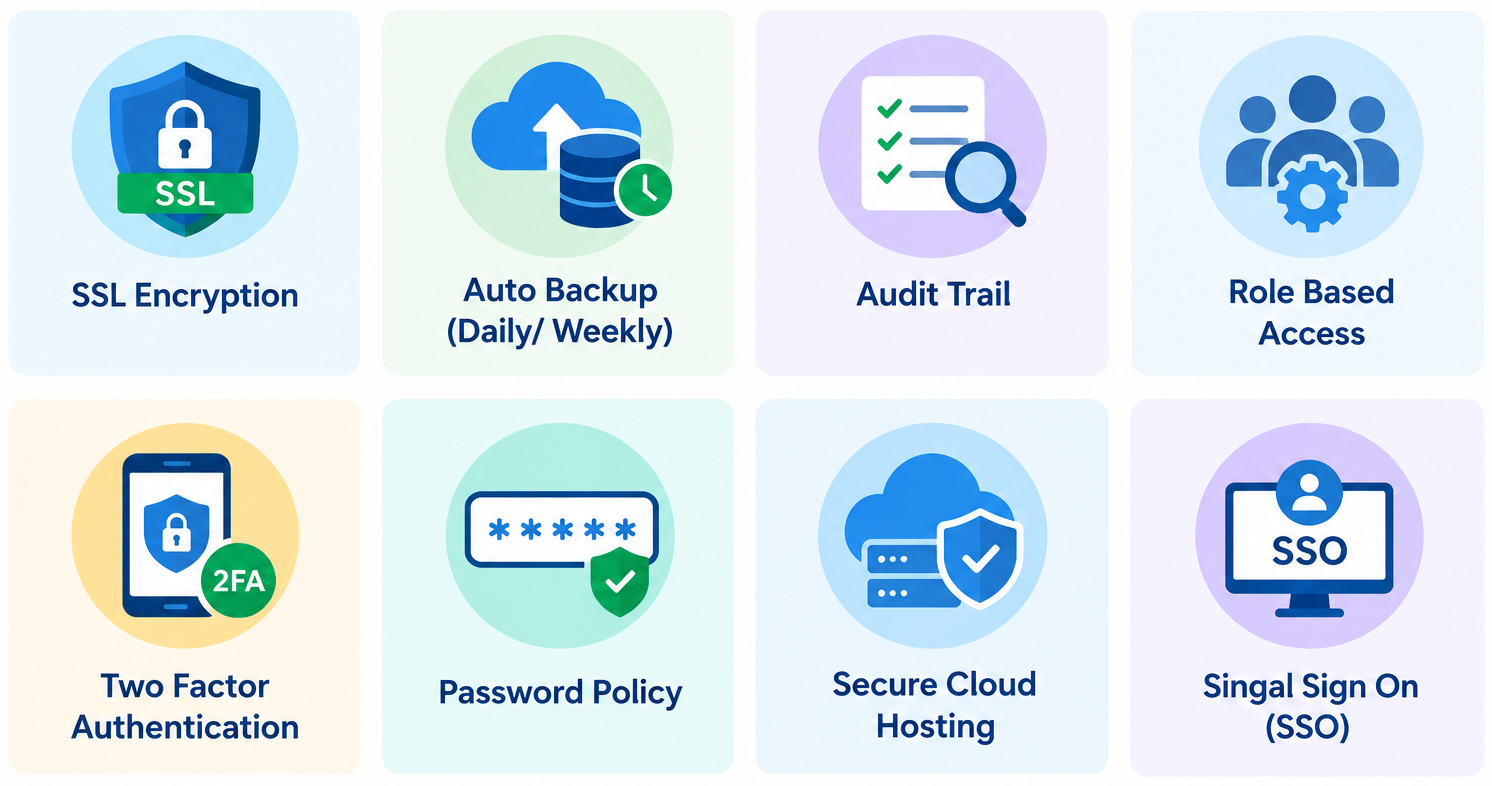
- ✔ SSL Encryption
- ✔ Auto Backup (Daily/Weekly)
- ✔ Audit Trail
- ✔ Role-Based Access
- ✔ Two-Factor Authentication
- ✔ Password Policy
- ✔ Secure Cloud Hosting
- ✔ Single Sign-On (SSO)
Frequently Asked Questions About Safety Observation Management Software
What Is Safety Observation Management Software?
- Safety Observation Management Software is a digital system used to capture, classify, track, analyse, and close workplace safety observations. It replaces paper forms, spreadsheets, and manual registers with a centralized platform. Organizations can record unsafe acts, unsafe conditions, hazards, positive safety behaviours, near misses, and other EHS observations, then assign corrective actions, monitor progress, attach evidence, and maintain records for reporting and safety performance analysis.
How Does Safety Observation Software Work?
- Safety observation software provides a structured workflow for managing workplace observations. Users record an observation, select the relevant category, location, department, and severity, and can attach photographs or supporting information. The observation can then be reviewed and assigned to a responsible person for corrective action. Target dates and action status are monitored until completion and verification. QHSEalert connects observation reporting, corrective action tracking, follow-up, closure, and analysis in one digital system.
What Can Safety Observation Software Track?
- Safety observation software can track unsafe acts, unsafe conditions, hazards, positive safety observations, near misses, PPE issues, housekeeping concerns, equipment conditions, environmental observations, and other EHS information. It can also record the observer, location, department, category, severity, responsible person, target date, action status, photographs, supporting documents, and closure details. QHSEalert helps organizations maintain these records centrally so safety teams can monitor actions and identify recurring workplace safety issues.
What Are the Features of Safety Observation Software?
- Key features of safety observation software include digital observation forms, mobile reporting, customizable categories, photograph and document attachments, observation classification, corrective action assignment, due-date monitoring, notifications, workflow management, dashboards, reports, search and filters, trend analysis, user access controls, and audit trails. QHSEalert brings these capabilities together to help organizations manage safety observations from initial reporting through corrective action, verification, closure, and safety performance analysis.
What Is the Difference Between Safety Observations and Near Misses?
- A safety observation is a broad record of a workplace condition, behaviour, hazard, or positive safety practice identified during normal work, inspections, site tours, or other activities. A near miss generally involves an unplanned event or situation where injury, damage, or another loss could have occurred but did not. For example, missing PPE may be an unsafe-act observation, while an object falling close to a worker without causing injury may be recorded as a near miss.
Can Employees Report Observations Using a Mobile Phone?
- Yes. QHSEalert provides mobile access for authorized users to report and manage safety observations from supported mobile devices. Employees, supervisors, safety officers, and contractors can record observations while working at the site, enter relevant details, and attach photographs or supporting information. Mobile safety observation reporting reduces dependence on paper forms and helps organizations capture workplace hazards and unsafe conditions closer to the time and location where they are identified.
Can Corrective Actions Be Assigned and Tracked?
- Yes. Safety observations can be linked to corrective or preventive actions and assigned to responsible persons. The action can include a target completion date, status, and supporting evidence. Safety teams can monitor pending, in-progress, completed, or overdue actions according to the configured workflow. QHSEalert provides a structured connection between the original observation and the action taken, helping organizations improve accountability, follow-up, verification, and closure of identified safety issues.
Can Overdue Safety Actions Be Monitored?
- Yes. Safety observation software can monitor corrective actions according to their status and target completion dates. Safety teams can identify pending, completed, and overdue actions through dashboards, reports, filters, or notifications, depending on the configured system. QHSEalert helps users maintain visibility of outstanding safety activities and follow up with responsible persons. This provides a structured method for monitoring corrective action progress instead of relying on manual registers or separate spreadsheets.
Can Safety Observation Forms Be Customized?
- Yes. Safety observation forms can be configured according to an organization’s processes, terminology, categories, and reporting requirements. Organizations can define fields such as observation type, location, department, severity, responsible person, and workflow status. QHSEalert can support customized observation categories and workflows so organizations can digitize their existing safety observation process. This flexibility is particularly useful for organizations managing different departments, operational areas, sites, or industry-specific safety requirements.
Can Safety Observations Be Analysed Through Dashboards?
- Yes. Safety observation data can be analysed through dashboards, reports, filters, and trend analysis. Depending on the configured data, users can review observations by category, department, location, severity, status, responsible person, or time period. QHSEalert helps convert individual safety observations into structured safety performance information. Management can use this information to identify recurring issues, monitor corrective actions, review trends, and identify areas where additional safety improvement activities may be required.
Can the Software Manage Observations from Multiple Departments or Locations?
- Yes. Safety observation software can manage observations across multiple departments, work areas, locations, or sites. Users can record the relevant location and organizational information when submitting an observation, allowing safety teams to filter and analyse information accordingly. QHSEalert provides a centralized approach for managing safety observations while maintaining visibility of where observations originate. User access, workflows, reporting structures, and organizational hierarchies can be configured according to implementation requirements.
Who Uses Safety Observation Software?
- Safety observation software can be used by employees, supervisors, safety officers, HSE managers, QHSE managers, plant managers, department heads, contractors, safety committee members, internal auditors, and management. Different users can have different responsibilities for reporting, reviewing, assigning, monitoring, verifying, or closing observations. QHSEalert can be configured with appropriate user roles and access permissions, helping organizations establish a structured safety observation process across departments and operational locations.
What Industries Use Safety Observation Software?
- Safety observation software can be used across industries where organizations need to identify workplace hazards and manage corrective actions. Common applications include manufacturing, chemical and petrochemical, pharmaceutical, construction, oil and gas, engineering, infrastructure, power and utilities, warehousing, and logistics. Observation categories can be adapted to different operational risks. QHSEalert can be configured according to industry requirements, including departments, locations, observation categories, workflows, users, corrective actions, and reporting requirements.
How Does Safety Observation Software Improve Safety Management?
- Safety observation software helps organizations move from manually recording observations to systematically managing safety information and corrective actions. Centralized data makes it easier to identify recurring hazards, monitor open and overdue actions, analyse trends, and review safety performance. Mobile reporting can simplify workplace observation capture, while dashboards provide management visibility. QHSEalert connects observation reporting, corrective action, follow-up, verification, and analysis, helping organizations use observations as an input for proactive safety management and continuous improvement.
Is Safety Observation Software Useful for ISO 45001 Systems?
- Safety observation software can support an organization’s ISO 45001 occupational health and safety management processes by providing structured records, corrective action tracking, monitoring, and safety performance information. It can help maintain evidence of identified issues, actions, follow-up, and analysis. However, software alone does not make an organization ISO 45001 compliant or certified. QHSEalert should therefore be considered a digital supporting tool for an organization’s broader occupational health and safety management system.
How Can I See a Demonstration of QHSEalert Safety Observation Management Software?
- You can request a demonstration of QHSEalert Safety Observation Management Software to understand how the platform can support your organization’s safety observation process. The demonstration can cover digital reporting, mobile access, observation categories, photographs, corrective action assignment, action tracking, dashboards, reports, notifications, user access, and workflow configuration. You can also discuss your organization’s departments, locations, users, existing observation process, and reporting requirements to determine the appropriate configuration.