

Accident Reporting And Investigation Management Software
Accident Reporting And Investigation Management Software by QHSEalert helps organizations digitally report, investigate, analyze and manage workplace accidents, incidents and near misses. The system provides a centralized platform to capture incident information, identify root causes, assign corrective actions, monitor investigation progress and analyze safety trends.
From initial incident reporting to investigation closure, the software provides visibility across the complete accident management process. Employees can report incidents, responsible personnel can investigate them, and management can monitor actions, trends and safety performance from a centralized system.
What Is Accident Reporting And Investigation Management Software?
Accident reporting and investigation management software is a digital system used to record workplace accidents and incidents, conduct investigations, identify causes and manage corrective actions.
Instead of relying on paper forms, spreadsheets, emails and manually maintained investigation records, organizations can manage the complete incident lifecycle through a centralized platform.
The software can be configured to manage different event types such as near misses, injuries, first aid cases, lost time injuries, fire emergencies, property damage and other workplace incidents.
How Does Accident Reporting and Investigation Management Software Work?
Report the Accident or Incident
Employees or authorized users can report accidents, incidents and near misses using a defined reporting form. Relevant information such as date, time, location, department, event type, description and other required details can be captured.
Record Incident Details
The incident record can contain information required for investigation, including people involved, location, immediate actions, photographs, observations and other supporting information.
Investigate the Event
Authorized investigators can review the incident and record investigation findings. The workflow helps ensure that important investigation information is documented systematically.

Identify Root Causes
The investigation process can be used to identify immediate, underlying and root causes of an accident or incident.
Assign Corrective Actions
Corrective actions can be assigned to responsible persons with defined responsibilities and status tracking.
Review and Approve
Configured workflows allow responsible personnel to review, verify and approve incident investigations before closure.
Analyze Trends and Improve Safety
Historical incident information can be analyzed by event type, location, department, month, status and other parameters to identify recurring patterns and improvement opportunities.
Types of Accidents and Incidents You Can Manage
⚠️ Near Miss
Record events that could have resulted in injury, damage or loss and use the information to identify preventive actions.
🩹 First Aid Case
Document minor workplace injuries requiring first aid and track investigation and corrective actions.
🏥 Medical Treatment Case
Record incidents requiring medical treatment and manage the associated investigation and actions.
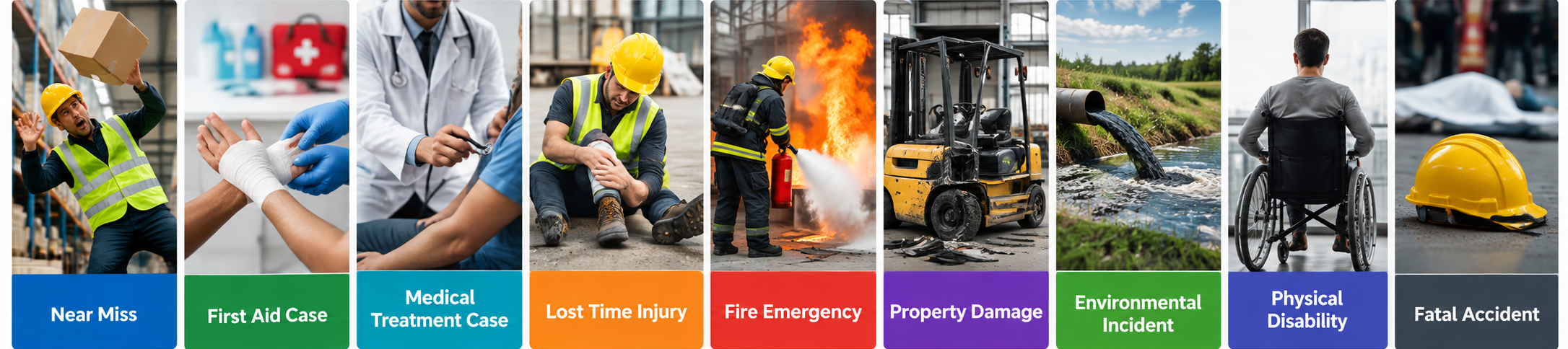
⏱️ Lost Time Injury
Track workplace injuries that result in lost work time and monitor investigation and corrective measures.
🔥 Fire Emergency
Record fire-related incidents and document investigation findings, causes and corrective actions.
🏭 Property Damage
Capture incidents involving damage to equipment, machinery, facilities or other property.
🌱 Environmental Incident
Record incidents involving potential or actual environmental impacts and manage associated actions.
♿ Physical Disability
Document serious incidents resulting in physical disability and maintain structured investigation records.
🕊️ Fatal Accident
Record and manage fatal workplace events through a controlled investigation and review workflow.
📋 Other Workplace Incidents
Organizations can configure additional event categories according to their operational and QHSE requirements.
Features of Accident Reporting And Investigation Management Software
📱 Mobile Accident Reporting
Users can access the system through mobile devices to report, review and manage accident and incident information from different workplace locations.
📝 Customizable Incident Forms
Incident reporting and investigation forms can be configured according to organizational requirements, event categories and workflows.
🏷️ Incident Classification
Classify incidents according to event type, severity, location, department or other organizational parameters.
📸 Photo and Evidence Capture
Relevant information and supporting evidence can be included in the incident record to support investigation and review.
🔔 Alerts and Notifications
Configured alerts and notifications help responsible users stay informed about reported incidents, pending actions and investigation activities.
🔄 Investigation Workflow
Create a structured workflow for reporting, reviewing, investigating, approving and closing incidents.
🔍 Root Cause Analysis
The software supports systematic identification and documentation of causes associated with accidents and incidents.
🛠️ Corrective Action Tracking
Assign corrective actions to responsible users and monitor their progress until completion.
✅ Incident Approval Workflow
Define responsibilities and approval stages according to the organization’s incident management process.
📊 Incident Trend Analysis
Analyze historical incidents to identify recurring event types, areas, departments and other patterns.
📈 Dashboard and Reports
View incident information through dashboards and reports to support safety monitoring and management review.
🔎 Search and Filters
Search historical incident records and filter information according to relevant parameters.
🔐 User Access Control
Control access to incident information based on users, responsibilities and configured permissions.
🌐 Multi-Language Support
Incident reporting and investigation forms can be configured to support two languages where required.
📤 Data Export
Incident information can be exported to formats such as Excel and PDF for reporting, review and record keeping.
💾 Automatic Backup
Daily automated backup helps protect incident records and supports data recovery requirements.
Accident Investigation Management
Accident investigation software helps organizations move beyond simply recording an event. The investigation process focuses on understanding what happened, why it happened and what actions are required to prevent recurrence.
QHSEalert provides a structured environment for documenting investigation information, identifying causes, assigning corrective actions and monitoring investigation status.
🔍 Incident Investigation
Record investigation findings and relevant information associated with the accident or incident.
🎯 Root Cause Identification
Analyze contributing factors and document identified causes as part of the investigation process.
🛠️ Corrective and Preventive Actions
Assign actions to responsible personnel and monitor their completion.
✅ Investigation Review and Approval
Use configured review and approval stages to maintain control over the investigation process.
📄 Investigation Report
Generate and export documented investigation information for internal review, management reporting and audit requirements.
Near Miss Reporting and Management
Near miss reporting software helps organizations capture events that did not result in injury or damage but could have had a more serious outcome.
Recording near misses provides organizations with additional safety information that can be reviewed alongside accidents and other incidents.
❓ Why Report Near Misses?
Near-miss records can provide information about unsafe conditions, behaviors, process weaknesses and potential hazards before they result in an accident.
📝 Capture Near Miss Events
Users can record near-miss information using a defined reporting form.
🔍 Investigate Near Misses
Organizations can investigate significant near misses and document their causes and contributing factors.
🛠️ Track Corrective Actions
Actions can be assigned to responsible personnel and monitored until completion.
📊 Analyze Recurring Trends
Historical near-miss information can be analyzed together with accident and incident data to identify recurring safety issues.
Workflow of Accident Reporting And Investigation Management Software
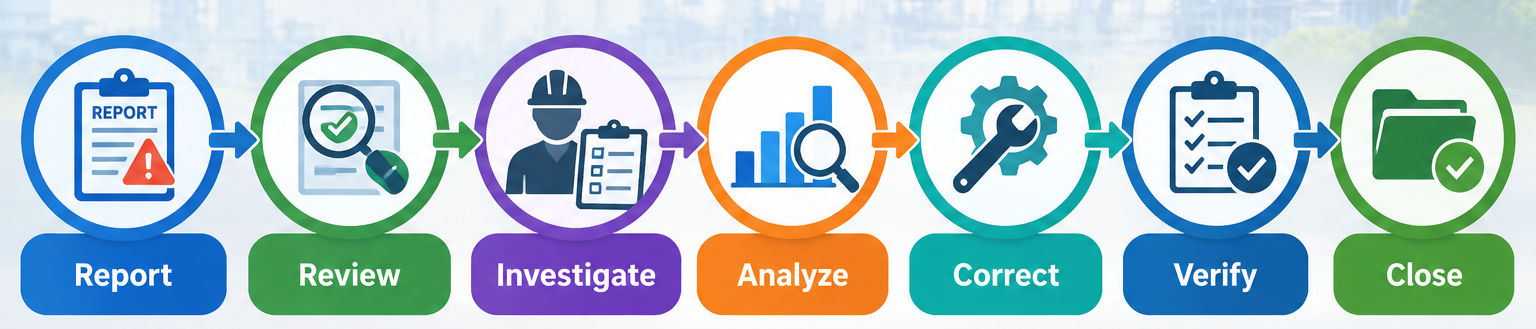
A structured digital workflow helps organizations maintain control over the complete incident lifecycle:
Report → Review → Investigate → Analyze → Correct → Verify → Close
Each stage can be configured according to the organization’s responsibilities, approval requirements and investigation process.
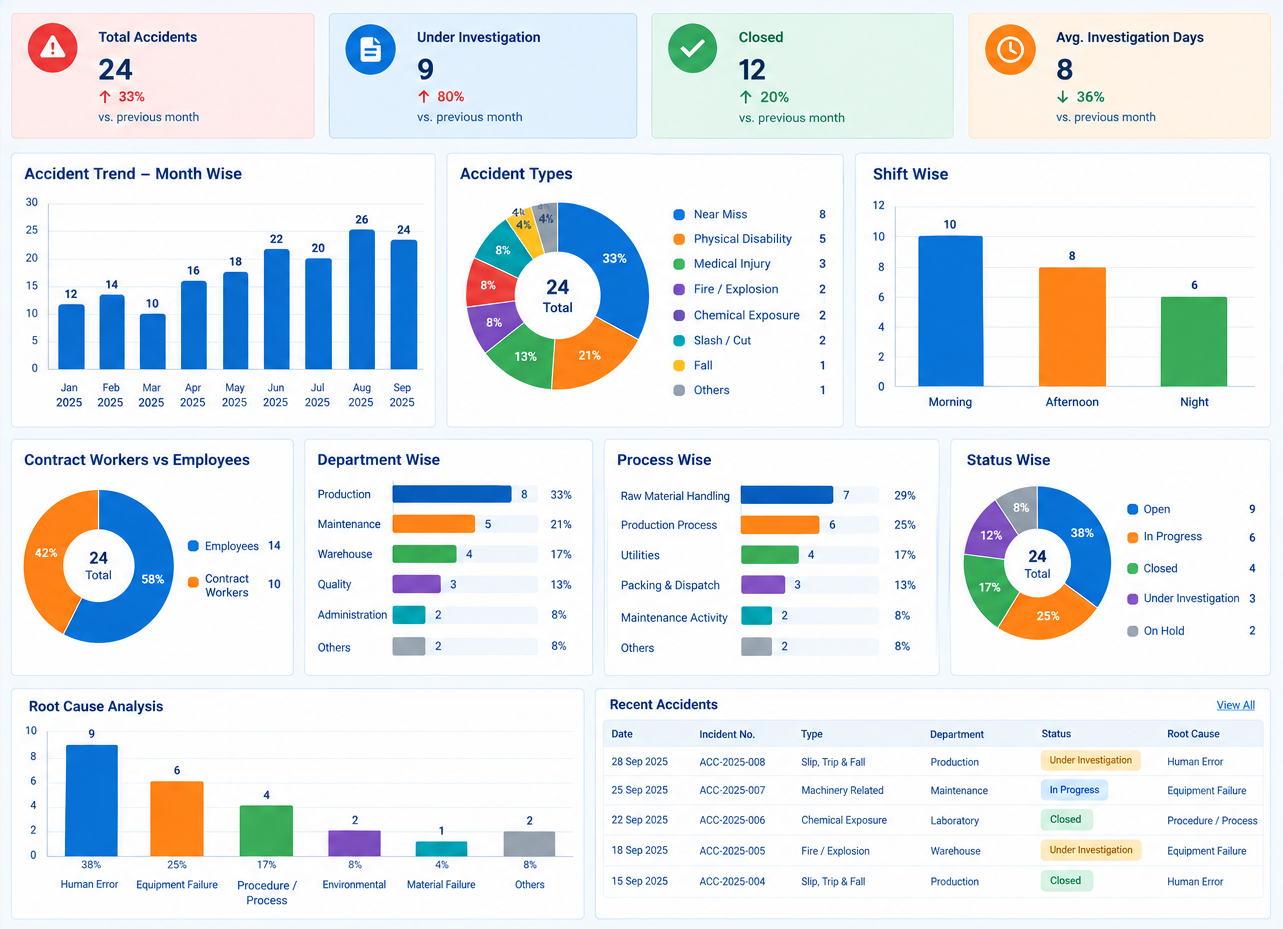
Accident & Incident Management Dashboard
Incident Trends
Identify changes and recurring patterns in reported incidents over time.
Incident Type Analysis
Analyze the frequency of different types of accidents, incidents and near misses.
Area-Wise Analysis
Identify locations or operational areas associated with reported events.
Department-Wise Analysis
Review incident information according to department or organizational unit.
Status-Wise Analysis
Monitor incidents according to reporting, investigation, action and closure status.
Monthly and Yearly Analysis
Review historical incident information over selected time periods.
Benefits of Accident Reporting Software
Faster Incident Reporting
Digital reporting reduces dependency on paper forms and helps information reach responsible personnel more efficiently.
Centralized Incident Records
Maintain accident, incident and near-miss information in a centralized system.
Better Investigation Control
A defined workflow helps organizations manage investigation activities systematically.
Improved Corrective Action Tracking
Assign and monitor actions with greater visibility of responsibilities and status.
Better Safety Visibility
Dashboards and analytics provide management with a consolidated view of incident information.
Paperless Incident Management
Replace manually maintained incident records with a centralized digital system.
Improved Accountability
Defined responsibilities, workflows and action tracking provide visibility into who is responsible for each activity.
Easier Audit and Compliance Reporting
Searchable historical records and exportable reports can simplify the retrieval of incident information during audits and management reviews.
Why Choose QHSEalert Accident Management Software?
Complete Incident Lifecycle
Manage reporting, investigation, corrective actions and closure in one platform.
Customizable Workflow
Configure reporting and investigation processes according to requirements.
Mobile Access
Report and manage incidents from mobile devices.
Root Cause Analysis
Document and analyze causes identified during investigations.
Corrective Action Tracking
Assign and monitor actions through defined workflows.
Incident Analytics
Analyze trends across event types, departments, locations and time periods.
Centralized Records
Maintain accident, incident and near-miss records in one system.
Access Control
Control visibility of incident information according to user responsibilities.
Reporting & Export
Retrieve and export incident information for reporting and review.
Implementation Support
Configuration, user mapping, training and post-live support are available.
Accident Reporting Software Implementation & Support
Software Setup
Configure the system according to the organization’s incident categories, reporting requirements and workflow.
Customization
Customize incident categories, forms, workflows, reports and other requirements.
User Mapping
Map users according to their responsibilities and authority for reporting, investigation, and approval.
User Training
Provide training to help users understand the reporting and investigation workflow.
Post-Live Support
Provide ongoing support for system-related queries, configuration requirements and user assistance.
Frequently Asked Questions
What is accident reporting and investigation software?
- Accident reporting and investigation software is a digital system used to record workplace accidents, investigate their causes, assign corrective actions and monitor closure. It replaces or reduces dependence on paper forms and spreadsheets by providing a centralized platform for incident reporting, investigation, action tracking, dashboards and historical records.
What is the difference between accident and near-miss reporting?
- Accident reporting records events that resulted in injury, illness, property damage or another actual loss. Near-miss reporting records events that did not result in a loss but had the potential to do so. Both types of information can be valuable for identifying hazards, investigating causes and improving workplace safety.
Can employees report accidents using a mobile phone?
- Yes. QHSEalert provides mobile access for users to add, review and manage incident information. This allows accident and near-miss information to be reported closer to the point where the event occurs rather than requiring users to return to a desktop computer.
Can accident investigation workflows be customized?
- Yes. QHSEalert supports customizable workflows for reporting, responding to and managing incidents. Organizations can configure categories, responsibilities and workflow stages according to their internal accident investigation process.
Can the software perform root cause analysis?
- QHSEalert includes root-cause analysis functionality to help organizations document and analyze the causes associated with accidents and incidents. The identified causes can then be linked to corrective actions and subsequent follow-up.
Can corrective actions be assigned and tracked?
- Yes. Corrective actions can be assigned to responsible personnel and monitored through the software. Action monitoring provides visibility into progress and helps users follow up on outstanding actions.
Can accident reports be exported?
- Yes. QHSEalert supports exporting incident information into formats including Excel and PDF, making it easier to use records for reporting, review and audits.
Can the software manage different types of incidents?
- Yes. The system supports multiple event categories and can be configured according to an organization’s requirements. Examples include near misses, first aid cases, fire emergencies, lost time injuries, physical disability and fatal events.
Can accident data be analyzed through dashboards?
- Yes. Incident information can be analyzed through graphical dashboards based on parameters such as incident type, area, month, user and status.
Can multiple users access the software?
- Yes. QHSEalert supports multiple users with user-access controls that allow administrators to manage access to incident information according to defined responsibilities.