

EHS Inspection Management Software | QHSEalert
EHS Inspection Management Software is a digital solution for planning, conducting, recording, tracking, and analyzing Environmental, Health and Safety inspections. It helps organizations replace paper-based inspection processes with digital checklists, mobile access, real-time reporting, corrective action tracking, dashboards, and centralized inspection records. The software enables EHS and HSE teams to identify unsafe conditions, hazards, non-conformities, and compliance gaps, assign responsibilities, monitor corrective actions, and use inspection data for continuous improvement.
Whether you need workplace safety inspections, equipment inspections, site inspections, environmental inspections, compliance inspections, or routine HSE checks, EHS Inspection Management Software provides a systematic way to manage the complete inspection process from planning to closure and analysis.
What is EHS Inspection Management Software?
EHS Inspection Management Software is a centralized system used to manage workplace Environmental, Health and Safety inspections electronically. Instead of maintaining inspection checklists, findings, reports, corrective actions, and follow-up records manually, organizations can manage the complete inspection workflow through a single digital platform.
The software allows EHS teams to create customized inspection requirements, conduct inspections, record findings, assign corrective actions, monitor responsibilities and deadlines, generate reports, and analyze inspection trends. It can be used across departments, locations, plants, projects, equipment, processes, and other inspection areas.
A digital inspection management system improves visibility of inspection activities and provides management with current information about completed inspections, findings, pending actions, overdue actions, and recurring safety issues.
How EHS Inspection Management Software Works
1. Plan and Schedule Inspections
Create inspection requirements based on location, department, equipment, process, activity, inspection type, or organizational requirements. Inspection activities can be planned and monitored so that important inspections are not overlooked.
2. Conduct Digital Inspections
Inspectors can use digital inspection checklists to record inspection results, observations, findings, and other required information. Mobile access makes it possible to manage inspection information from the workplace or field.
3. Identify Hazards and Findings
Record unsafe conditions, hazards, non-conformities, deficiencies, compliance gaps, and other findings identified during the inspection.
4. Assign Corrective Actions
Inspection findings can be followed through the corrective action process by assigning responsibility and tracking the required action until completion.
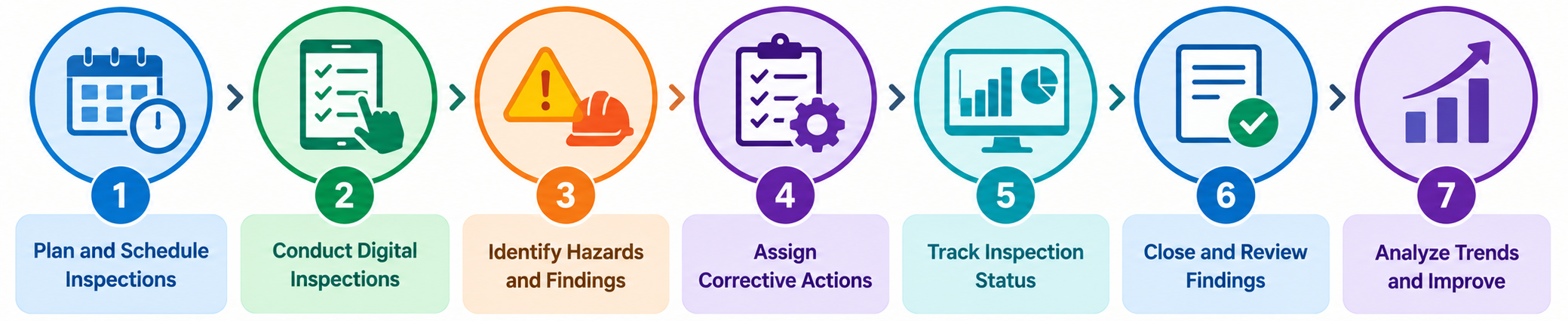
5. Track Inspection Status
Monitor inspection progress, findings, corrective actions, responsibilities, and pending activities through centralized records and dashboards.
6. Close and Review Findings
Track completed actions and inspection records to support proper closure and maintain an organized history of inspection activities.
7. Analyze Trends and Improve
Use inspection data, reports, dashboards, and trend analysis to identify recurring findings, problem areas, and opportunities for improving workplace safety performance.
Features of EHS Inspection Management Software
⚙️ Customizable Inspection Requirements
Configure inspection requirements, checklists, inspection parameters, standards, and monitoring criteria according to specific organizational and operational needs. Different departments, sites, equipment, processes, or inspection types can be managed according to their individual requirements.
📋 Digital Safety Inspection Checklists
Replace paper-based inspection forms with digital checklists that can be used to conduct standardized workplace safety and EHS inspections.
♾️ Unlimited Inspections
Record and manage inspection activities continuously without limiting the number of inspection records, supporting routine inspections and ongoing workplace monitoring.
📱 Mobile EHS Inspection Access
Access and manage inspection information through mobile devices, allowing inspectors and authorized users to work with inspection data while away from their desks.
📤 Instant Inspection Report Sharing
Inspection reports can be shared instantly through available communication options such as WhatsApp or email, helping communicate findings and inspection results quickly.
🔍 Search and Filter Inspection Records
Search and filter inspection records to quickly find information based on available inspection data and improve retrieval of historical inspection information.
📊 Excel Data Export
Export inspection data to Excel for further analysis, reporting, documentation, and management review.
📈 Inspection Data Analysis
Analyze inspection information to identify trends, recurring findings, problem areas, and opportunities for improvement.
📊 Interactive EHS Inspection Dashboard
Use an interactive dashboard to monitor inspection information and obtain a consolidated view of inspection activities, findings, and performance.
📉 Inspection Trend Analysis
Analyze recurring inspection findings and identify patterns that can help EHS teams focus on repeated problems and areas requiring improvement.
🔄 Customizable Inspection Workflow
Configure workflows according to organizational requirements for recording, reviewing, assigning, monitoring, and closing inspection findings.
🛠️ Corrective Action Tracking
Track actions arising from inspection findings and monitor their progress, responsibilities, and completion status.
👥 Unlimited Users
The system supports multiple users without applying license fees on a per-user basis, allowing organizations to provide access to relevant personnel.
🔐 User Access Control
Administrators can control access to inspection information according to user responsibilities and mapped access rights.
💾 Daily Automatic Backup
Inspection data is automatically backed up on a daily basis. Backup data can be restored manually by an authorized administrator when required.
Types of EHS and Safety Inspections You Can Manage

Workplace Safety Inspections
Conduct routine inspections of workplaces, work areas, facilities, and operating conditions to identify unsafe conditions and potential hazards.
Equipment and Machinery Inspections
Manage inspections related to machinery, equipment, tools, and other operational assets.
Fire and Emergency Safety Inspections
Record and monitor inspections related to fire prevention systems, emergency preparedness, emergency equipment, and other safety requirements.
Environmental Inspections
Manage inspections associated with environmental conditions, controls, waste management, emissions, storage, and other environmental requirements.
Electrical Safety Inspections
Record inspection findings related to electrical installations, equipment, panels, wiring, protection systems, and electrical safety practices.
Housekeeping and Workplace Condition Inspections
Monitor workplace housekeeping, storage, access, material handling, cleanliness, and general workplace conditions.
Process and Operational Safety Inspections
Conduct inspections of processes and activities to identify unsafe conditions, operational risks, and deviations from defined requirements.
Compliance Inspections
Use digital inspections to monitor organizational requirements, regulatory requirements, standards, procedures, and internal controls.
Benefits of EHS Inspection Management Software
👥 Improve Employee Engagement
Digital inspection processes make it easier for employees and responsible personnel to participate in inspection activities, record findings, and follow assigned actions. This supports greater accountability and participation in workplace safety.
🔔 Never Miss Important Inspection Activities
Inspection information and timely alerts help teams monitor important inspection activities and reduce the possibility of missing required inspection tasks.
📊 Real-Time Inspection Tracking
Monitor inspection activities, findings, and actions using current information rather than waiting for manual consolidation of inspection records.
👤 Improve Accountability
Assign responsibilities and monitor inspection findings and corrective actions so that responsibilities are clearly visible to relevant users.
🗂️ Centralized Inspection Management
Maintain inspection records, findings, reports, and related information in a centralized system for easier management across departments and locations.
📄 Paperless Inspection Process
Replace paper-based inspection forms and manual recordkeeping with digital inspection records, helping reduce paperwork and simplify document retrieval.
🔍 Easy Retrieval of Inspection Records
Search and retrieve historical inspection records quickly for management review, internal audits, compliance verification, and trend analysis.
👁️ Improve Transparency
Centralized inspection information provides greater visibility of inspection activities, findings, responsibilities, corrective actions, and outcomes.
🔄 Support Continuous Improvement
Inspection trends and historical findings can help organizations identify recurring issues and focus improvement activities on areas requiring attention.
EHS Inspection Reporting and Analytics
Inspection Performance Monitoring
Monitor inspection activities and understand the current status of inspections and related findings.
Finding and Non-Conformity Analysis
Analyze inspection findings to identify common deficiencies, recurring problems, and areas requiring corrective action.
Trend Analysis
Review inspection trends over time to identify recurring conditions and determine where preventive or improvement actions may be required.
Management Dashboards
Interactive dashboards provide management with a consolidated view of inspection information for monitoring and decision-making.
Inspection Data Export
Export inspection records to Excel for additional analysis, customized reporting, management review, and documentation.
Corrective Action Tracking Through EHS Inspections
Assign Responsibility
Inspection findings can be linked to responsible users according to organizational roles and authority.
Monitor Action Progress
Track the progress of actions associated with inspection findings and identify pending activities.
Improve Follow-Up
Centralized records make it easier for EHS teams and management to follow up on inspection findings and outstanding actions.
Maintain Inspection History
Inspection findings and related information remain available as part of the organization’s historical inspection records, supporting future analysis and management review.
User Access and Inspection Responsibility Management
Role-Based User Mapping
Users can be mapped according to their responsibilities and authority to add, review, and approve EHS inspection reports.
Controlled Data Access
Administrators can control which inspection information users can access based on their mapped responsibilities.
Multi-Department and Multi-Location Management
Organizations can use centralized inspection management while controlling access to information across relevant departments, locations, plants, or sites.
EHS Inspection Software Setup and Support
Software Setup
The software configuration is completed according to the agreed implementation requirements and scheduled timeline to support a smooth transition to the live application.
Inspection Process Customization
Inspection processes and workflows can be customized to suit specific organizational requirements.
User Mapping
Users can be mapped according to their responsibilities for adding, reviewing, approving, and managing inspection reports.
Demo Environment
A demo setup can be provided along with the live application to help new users understand the software and its functions.
User Training
Classroom training is provided to users to familiarize them with the EHS inspection application and its functions.
User Manual
A user manual containing instructions and screenshots is provided to support users in operating the software.
Video Tutorials
Video tutorials provide additional guidance for users and explain the use of different menus and functions.
Technical Troubleshooting
Technical support can be provided through online meetings and support tickets to help resolve software-related issues.
Post-Implementation Support
Ongoing post-support helps users maintain smooth operation of the EHS inspection management system and resolve issues when required.
Who Can Use EHS Inspection Management Software?

- ✔ Manufacturing Industry
- ✔ Chemical Industry
- ✔ Oil & Gas Industry
- ✔ Pharmaceutical Industry
- ✔ Construction Industry
- ✔ Mining & Metals Industry
- ✔ Power & Energy Industry
- ✔ Food & Beverage Industry
- ✔ Automotive Industry
- ✔ Warehousing & Logistics Industry
- ✔ Healthcare Industry
- ✔ Infrastructure & Utilities Industry
Why Digitalize Your EHS Inspection Process?
Traditional paper-based inspections and disconnected spreadsheets can make it difficult to maintain consistent inspection records, communicate findings, track responsibilities, and analyze recurring problems. Digital EHS inspection management provides a structured process for recording inspections, managing findings, tracking corrective actions, retrieving historical information, and reviewing performance.
By moving from paper-based safety inspections to a centralized digital system, organizations can improve inspection visibility, accountability, reporting, and continuous improvement.
EHS Inspection Software for Proactive Safety
EHS inspections are an important part of identifying unsafe conditions, monitoring workplace controls, and improving safety performance. EHS Inspection Management Software helps organizations move from manual inspection records toward a systematic digital process in which inspection information can be recorded, communicated, tracked, analyzed, and used for improvement.
The objective is not only to complete an inspection checklist but also to ensure that inspection findings receive appropriate attention and that inspection data contributes to better workplace safety management.
EHS Inspection Management Software FAQs
What is EHS Inspection Management Software?
- EHS Inspection Management Software is a digital system used to plan, conduct, record, track, report, and analyze Environmental, Health and Safety inspections. It can include digital checklists, mobile access, inspection reports, corrective action tracking, dashboards, data analysis, user access control, and centralized inspection records.
What is the difference between EHS Inspection Software and Safety Inspection Software?
- EHS Inspection Software generally covers Environmental, Health and Safety requirements, while Safety Inspection Software focuses primarily on workplace safety inspections. In practice, the terms are often used interchangeably depending on the organization’s inspection scope and requirements.
Can EHS Inspection Software replace paper inspection checklists?
- Yes. Digital EHS inspection software can replace paper-based inspection checklists by allowing organizations to create, complete, store, search, report, and analyze inspection records electronically.
Can safety inspection software be used on mobile devices?
- Yes. Mobile access allows authorized users to access and manage EHS inspection information and reports through mobile devices, supporting inspection activities in workplaces and field locations.
Can inspection checklists be customized?
- Yes. Inspection requirements, checklists, workflows, standards, and monitoring parameters can be configured according to organizational requirements and different inspection types.
Can inspection findings be tracked after the inspection?
- Yes. Inspection findings can be monitored through the inspection management process, including responsibility assignment and tracking of related corrective actions.
Can EHS inspection data be exported to Excel?
- Yes. Inspection data can be exported to Excel for additional analysis, reporting, documentation, and management review.
Can multiple users use EHS Inspection Management Software?
- Yes. Multiple users can access the system according to their assigned responsibilities and access permissions. The system supports user mapping and controlled access to inspection information.
Can EHS Inspection Software be used for multiple locations?
- Yes. Organizations can use centralized EHS inspection management across multiple plants, facilities, departments, projects, or other locations while managing applicable inspection requirements.
What types of inspections can be managed?
- Depending on configuration, the system can support workplace safety inspections, equipment inspections, machinery inspections, fire and emergency inspections, electrical safety inspections, environmental inspections, housekeeping inspections, process safety inspections, compliance inspections, and other customized inspection requirements.
Does EHS Inspection Software provide dashboards?
- Yes. Interactive dashboards can provide a consolidated view of inspection information and support monitoring, reporting, data analysis, and trend analysis.
Does the software provide inspection trend analysis?
- Yes. Inspection data can be analyzed to identify recurring findings, trends, non-conformities, and areas requiring improvement.
Is inspection data automatically backed up?
- The EHS Inspection Management Software provides daily automatic data backup. Authorized administrators can manually restore backup data when required.
What support is provided for EHS Inspection Management Software?
- Support can include software setup, customization, user mapping, user manuals, training, demo setup, video tutorials, troubleshooting assistance, and post-implementation support.