Safety Permit to Work (PTW) Software | QHSEalert
Safety Permit to Work (PTW) Software by QHSEAlert is a comprehensive digital solution that helps organizations create, manage, approve, monitor, and close work permits efficiently. Our Permit to Work Software replaces paper-based permit systems with a secure electronic workflow, improving workplace safety, regulatory compliance, and operational efficiency. Designed for industries such as oil & gas, construction, manufacturing, chemical, mining, and utilities, this Digital Permit to Work (ePTW) Software supports Hot Work, Confined Space Entry, Electrical Work, Lockout Tagout (LOTO), Excavation, Work at Height, and other critical safety permits through configurable approval workflows, real-time dashboards, mobile accessibility, and complete audit trails.
What is Safety Permit to Work (PTW) Software?
Safety Permit to Work (PTW) Software is a digital permit management solution that enables organizations to create, approve, issue, monitor, extend, suspend, and close safety work permits through a secure electronic workflow. Unlike traditional paper-based permit systems, Permit to Work Software digitizes the entire permit lifecycle, helping organizations improve workplace safety, strengthen regulatory compliance, reduce manual paperwork, and increase operational efficiency.
A Digital Permit to Work (ePTW) Software system ensures that every permit follows a standardized approval process before hazardous work begins. It verifies that potential risks have been identified, necessary control measures are in place, required personal protective equipment (PPE) has been specified, and all responsible personnel have approved the work. This structured workflow minimizes human error and helps prevent incidents caused by unauthorized or uncontrolled work activities.
Modern Safety Permit Software supports a wide range of permit types, including Hot Work Permits, Confined Space Entry Permits, Electrical Work Permits, Lockout Tagout (LOTO) Permits, Excavation Permits, Work at Height Permits, Cold Work Permits, Lifting Permits, and other specialized permits. It also integrates with risk assessments, Job Safety Analysis (JSA), isolation management, contractor management, and inspection processes to provide complete visibility and control over high-risk work.
Types of Safety Permits Supported on QHSEalert PTW Software

Custom Any Safety Permit of Own
Hot Work Permit
Controls work activities involving open flames, welding, cutting, grinding, brazing, or any operation capable of generating heat, sparks, or ignition sources. The permit ensures that fire prevention measures, gas testing, firefighting equipment, and work area inspections are completed before work begins.
Confined Space Permit
Manages work inside enclosed spaces where hazardous atmospheres, oxygen deficiency, toxic gases, or restricted entry and exit may present serious risks. The permit verifies gas testing, ventilation, rescue, other preparedness before entry.
Electrical Work Permit
Controls maintenance, installation, testing, or repair activities involving electrical equipment and energized systems. The permit confirms electrical isolation, verification of de-energization, competency of personnel, PPE requirements, and safe work practices.
LOTO Permit
Ensures hazardous energy sources are properly isolated before maintenance or servicing activities begin. The permit documents lockout devices, isolation points, responsible personnel, and verification procedures to prevent accidental energization.
Excavation Permit
Authorizes excavation, trenching, drilling, and earthmoving activities. It helps verify underground utilities, soil stability, excavation protection, access arrangements, and emergency response requirements before excavation work starts.
Height Work Permit
Controls activities performed above ground level where there is a risk of falling. The permit confirms fall protection systems, scaffolding inspections, ladder safety, anchor points, rescue planning, and worker competency.
Cold Work Permit
Authorizes maintenance and repair activities that do not generate flames or ignition sources but still require safety controls due to operational or environmental hazards.
Lifting Permit
Manages crane operations, heavy lifting, and material handling activities. The permit ensures lifting plans, equipment inspections, load calculations, operator competency, communication methods, and exclusion zones are established.
Radiography Permit
Controls industrial radiography activities involving radioactive sources or X-ray equipment. The permit verifies radiation safety controls, exclusion zones, warning systems, monitoring devices, and regulatory compliance.
Line Breaking Permit
Authorizes the opening of pipelines, vessels, or process equipment containing hazardous liquids, gases, steam, or chemicals. The permit confirms depressurization, isolation, drainage, PPE requirements, and emergency preparedness.
What Are Challenges with Paper-Based Permit Systems?
Manual Data Entry Errors
Handwritten permits often contain incomplete information, incorrect dates, missing signatures, wrong permit numbers, or illegible handwriting. These errors can delay approvals and increase safety risks.
Time-Consuming Process
Paper permits must be physically reviewed and signed by multiple stakeholders. If an approver is unavailable or working at another location, permit issuance can be significantly delayed.
Lack of Real-Time Visibility
Safety managers cannot easily determine which permits are active, pending approval, suspended, or expired. This lack of visibility makes it difficult to monitor ongoing high-risk work.
Lost Permit Records
Paper permits can be misplaced, damaged, or archived incorrectly, making it difficult to retrieve historical records during audits, investigations, or regulatory inspections.
Difficult Compliance
Demonstrating compliance with company procedures, client requirements, or standards such as ISO 45001 becomes more challenging when records are stored manually across multiple files and locations.
No Automated Notifications
Paper systems cannot automatically notify users about permit approvals, rejections, permit expiry, or overdue closures, increasing the risk of permits remaining open longer than intended.
Limited Audit Trail
Manual systems do not provide a complete digital history of permit activities, approvals, modifications, and closures, making investigations and compliance audits more difficult.
Poor Coordination
Operations, maintenance, contractors, and safety teams often work from different copies of permits, increasing the likelihood of communication gaps and inconsistent information.
Higher Administrative Costs
Printing, distributing, storing, and retrieving paper permits consume time, office space, and administrative resources, resulting in higher operational costs.
Increased Safety Risks
When permits are incomplete, outdated, or not properly approved, critical hazards and control measures may be overlooked, increasing the likelihood of incidents, injuries, and regulatory violations.
Why Organizations Need Digital PTW Software?
⚠️ Improve Control Over High-Risk Work
📄 Replace Paper-Based Permit Processes
🛡️ Strengthen Safety Before Work Begins
🔐 Prevent Unauthorized Work
📢 Improve Permit Approval and Communication
📊 Monitor Active Permits in Real Time
🔒 Strengthen Lockout Tagout and Isolation Control
👷 Improve Contractor Safety Management
🚨 Respond Quickly to Unsafe Conditions and Emergencies
📝 Maintain Complete Permit Audit Trails
🏭 Standardize Permit Processes Across Departments and Sites
⚙️ Reduce Human Errors and Administrative Work
📱 Access Permit Information Anytime
📈 Improve Safety Performance Through Data and Analytics
✅ Support Compliance and Audit Readiness
🔄 Manage the Complete Permit Lifecycle Digitally
How Safety Permit Software Works
Step 1 – Raise a Permit Request
The permit applicant creates a new digital permit by selecting the required permit type, work location, work description, contractor or employee details, planned start and end time, and other relevant information. Mandatory fields ensure that incomplete permits cannot be submitted.
Step 2 – Identify Hazards & Controls
Potential hazards associated with the work are identified, and appropriate control measures are defined. Safety checklists, PPE requirements, gas testing results, isolation requirements, and supporting documents can be attached to ensure all risks are addressed before work begins.
Step 3 – Review & Multiple Approvals
The permit is automatically routed through the configured approval workflow. Supervisors, area authorities, safety officers, maintenance managers, or other authorized personnel can review the permit, request corrections, approve, or reject it based on company procedures.
Step 4+5 – Issue Permit & Execution
Once all required approvals have been completed, the permit is officially issued and becomes active. Workers and contractors can access permit details, safety instructions, and approval status through the system, ensuring that only authorized work is performed.
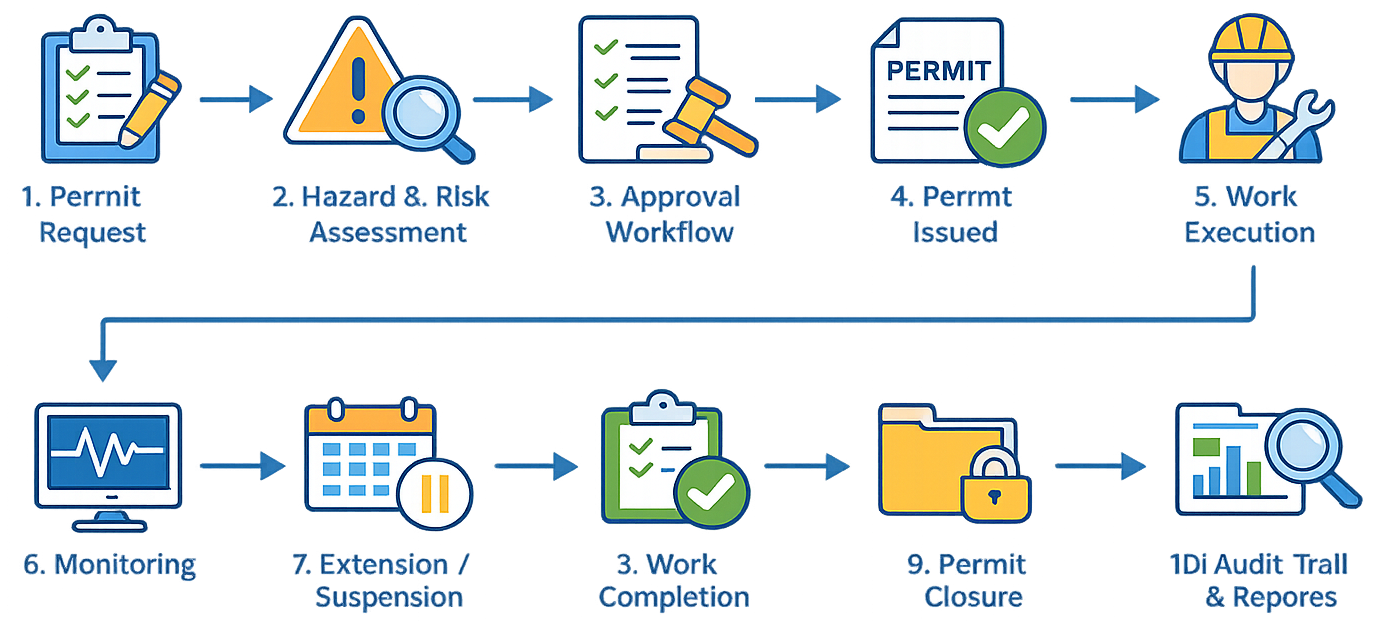
Step 6 – Monitor Work Activities
During execution, supervisors and safety teams can monitor the status of active permits in real time. The software provides visibility into ongoing work, permit validity, pending approvals, and work progress through centralized dashboards and notifications.
Step 7 – Permit Extension or Suspension
If work cannot be completed within the approved duration, authorized personnel can extend the permit after reviewing site conditions and confirming that safety controls remain effective. If unsafe conditions arise, permits can be suspended until corrective actions are completed.
Step 8+9 – Work Completion & Closure
After the work is completed, the responsible personnel verify that the job has been safely finished, the work area has been restored, tools and equipment have been removed, and all safety requirements have been satisfied. The permit is then digitally closed and archived for future reference.
Step 10 – Audit Trail and Reporting
Every action performed within the permit lifecycle—including permit creation, modifications, approvals, rejections, extensions, suspensions, and closure—is automatically recorded with user details and timestamps. This complete audit trail simplifies investigations, internal audits, compliance verification, and management reporting.
Isolation & LOTO Management
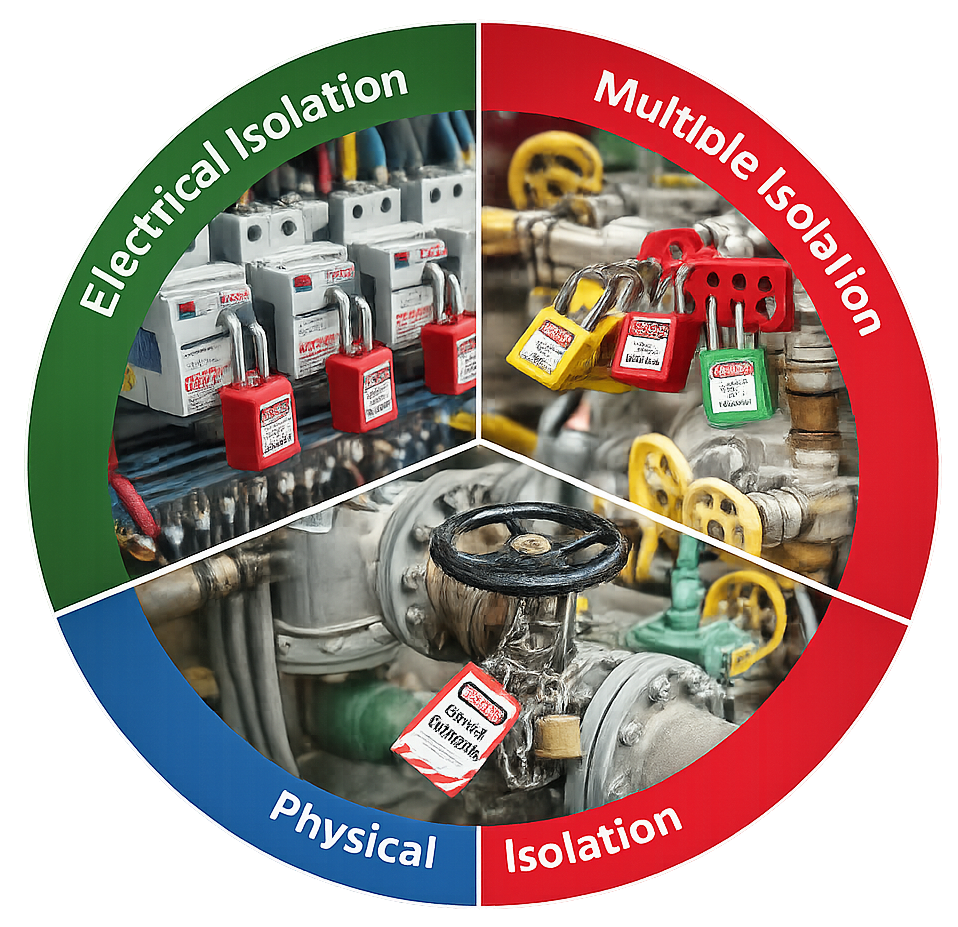
🔒 Lockout Tagout (LOTO) Control
Digitally manage Lockout Tagout (LOTO) procedures to ensure hazardous energy sources are safely isolated before maintenance or repair work begins. Record lock details, responsible personnel, verification status, and authorization within the permit workflow.
🚧 Physical Isolation
Manage physical isolation of equipment, pipelines, valves, and electrical systems to prevent the accidental release of hazardous energy. Verify all isolation points before permit approval to ensure a safe working environment.
🔗 Multiple Isolations
Associate multiple isolation points with a single work permit for complex maintenance activities involving multiple energy sources. Track and monitor each isolation independently to ensure complete safety and compliance.
Benefits of Digital Isolation & LOTO Management
- ✔ Improve control of hazardous energy sources
- ✔ Digitally manage Lockout Tagout procedures
- ✔ Reduce the risk of accidental equipment energization
- ✔ Ensure all required isolations are completed before work begins
- ✔ Integrate isolation verification with Permit to Work approvals
- ✔ Improve communication between operations and maintenance teams
- ✔ Maintain complete digital records and audit trails
- ✔ Strengthen compliance with organizational safety procedures and industry best practices
Risk Assessment Integration
Hazard Identification
Identify Hazards associated with each work activity, including physical, chemical, electrical, mechanical, environmental, and operational risks before issuing the permit.
Risk Evaluation
Assess the likelihood and severity of identified hazards using your organization’s Risk Evaluation methodology to determine the appropriate level of control required.
Control Measures
Define mandatory Control Measures such as PPE requirements, isolation procedures, gas testing, barricading, fire protection, ventilation, and safe work practices to reduce identified risks.
Hazard & Risk Library
Maintain a centralised Hazard & Risk Library of predefined hazards, risk ratings, and control measures to ensure faster, consistent, and standardized risk assessments.
Contractor Safety Management
Contractor Registration
Register and maintain contractor profiles with company details, contact information, licenses, and other essential records in a centralized database.
Contractor Competency Verification
Verify contractor qualifications, certifications, training records, and work authorizations before granting access to high-risk work activities.
Permit Authorization
Issue permits only to authorized contractors after completing the required approvals, risk assessments, and safety verifications.
Contractor Document Management
Store and manage contractor documents such as insurance certificates, licenses, safety training records, and statutory compliance documents digitally.
Contractor Access Control
Control contractor access to work locations by ensuring only approved personnel with valid permits can perform authorized activities.
Contractor Performance Monitoring
Track contractor permit history, safety compliance, work status, and performance to improve accountability and support informed decision-making.
Benefits of Contractor Safety Management
✔ Improve contractor safety compliance.
✔ Verify contractor competency before work begins.
✔ Digitally manage contractor permits and approvals.
✔ Centralize contractor documentation.
✔ Monitor contractor activities in real time.
✔ Enhance coordination between contractors and safety teams.
✔ Maintain complete audit trails and compliance records.
✔ Reduce administrative effort and paperwork.
Key Features of Permit to Work Software
Multiple Permit Types
Manage Hot Work, Confined Space Entry, Electrical Work, LOTO, Excavation, Work at Height, Cold Work, Lifting, and custom permit types from one platform.
Configurable Workflow
Configure multi-level approval workflows based on permit type, department, project, location, or organizational hierarchy.
Risk Assessment Integration
Link risk assessments, JSA/JHA, hazards, and control measures directly with every work permit.
Isolation Management
Manage energy isolation, Lockout Tagout (LOTO), physical isolations, and verification processes within the permit workflow.
Unlimited Users
Add unlimited users without worrying about user-based licensing, making it easy to scale as your organization grows.
Mobile Permit to Work
Create, review, approve, verify, and close permits using smartphones or tablets from anywhere.
Real-Time Dashboard
Monitor active permits, pending approvals, expired permits, contractor activities, and safety KPIs through live dashboards.
Notifications & Alerts
Receive automatic notifications for pending approvals, permit expiry, work completion, overdue actions, and critical safety events.
Benefits of of Permit to Work Software
📋 Centralized Permit Management
⚡ Faster Permit Approval
⚠️ Better Control of High-Risk Work
📄 Reduced Paperwork
🛡️ Improved Safety Compliance
📊 Real-Time Permit Monitoring
🔔 Automated Notifications and Alerts
👷 Improved Contractor Management
🔍 Better Risk Assessment
🔒 Lockout Tagout (LOTO) Control
📱 Mobile Permit Access
⚙️ Standardized Permit Workflows
❌ Reduced Human Errors
📝 Complete Audit Trail
📢 Better Communication
🔎 Faster Access to Records
🚨 Improved Emergency Response
👁️ Better Safety Visibility
📈 Safety Performance Analytics
🌐 Multi-Site Permit Management
👤 Improved Accountability
✅ Better Audit Readiness
✔️ Faster Permit Closure
🔄 End-to-End Permit Lifecycle Management
Mobile Permit to Work
Create-Approve-Verify on Mobile
Create, review, approve, and verify work permits directly from your smartphone or tablet with a secure digital workflow. Enable faster decision-making, reduce delays, and keep permit processes moving.
Photo & Document Upload
Capture site photographs and upload documents directly from your mobile device to support inspections, permit verification, and compliance.
Real-Time Notifications
Receive instant notifications for new permit requests, pending approvals, permit expiry, and work completion to stay informed at all times.
✔ Faster permit creation and approvals
✔ Real-time communication between teams
✔ Instant notifications and alerts
✔ Paperless workflows
✔ Easy photo and document capture
✔ Improved field productivity
✔ Better visibility into permit status
✔ Enhanced safety compliance
Industries Using PTW Software
Industries Using PTW Software
- ✔ Oil & Gas
- ✔ Construction
- ✔ Manufacturing
- ✔ Chemicals & Petrochemicals
- ✔ Mining
- ✔ Power & Utilites
- ✔ Cement
- ✔ Food & Beverage
- ✔ Marine & Offshore
- ✔ Infrastructure

Paper-based Permit vs QHSEAlert Safety Permit Software
| Feature | Paper-Based Permit System | QHSEAlert Digital Permit System |
|---|---|---|
| Permit Creation | Manual paper forms | Digital permit creation with predefined templates |
| Approval Process | Physical signatures and manual follow-up | Automated multi-level approval workflow |
| Permit Status | Difficult to track | Real-time permit status and dashboards |
| Document Storage | Paper files and physical archives | Secure cloud-based digital records |
| Risk Assessment | Separate paper documents | Integrated risk assessment with permits |
| LOTO & Isolation | Manual verification | Digital isolation and LOTO management |
| Notifications | Phone calls and emails | Automatic alerts and reminders |
| Mobile Access | Not available | Create, approve, and verify permits on mobile |
| Audit Trail | Limited or incomplete | Complete digital audit trail with timestamps |
| Reporting | Manual compilation | Instant reports and analytics |
| Compliance | Difficult to demonstrate | Audit-ready digital records |
| Contractor Management | Manual tracking | Centralized contractor management |
| Data Search | Time-consuming | Search permits instantly |
| Scalability | Difficult for multiple sites | Supports single or multiple locations |
| Paper Usage | High | Completely paperless |
Dashboard & Data Analysis of Safety Permit Software
Real Time Dashboard
Monitor active, pending, approved, suspended, and closed permits through a centralized dashboard. Gain instant visibility into permit status, approvals, and ongoing work activities.
Permit Status Report
Generate detailed reports on permit requests, approvals, rejections, expiry, and completion status. Track every permit throughout its lifecycle for better operational control.
Area-wsie Permit Data
Analyze permit activities across different plants, departments, projects, or work locations. Identify high-risk areas, workload distribution, and safety performance by location.
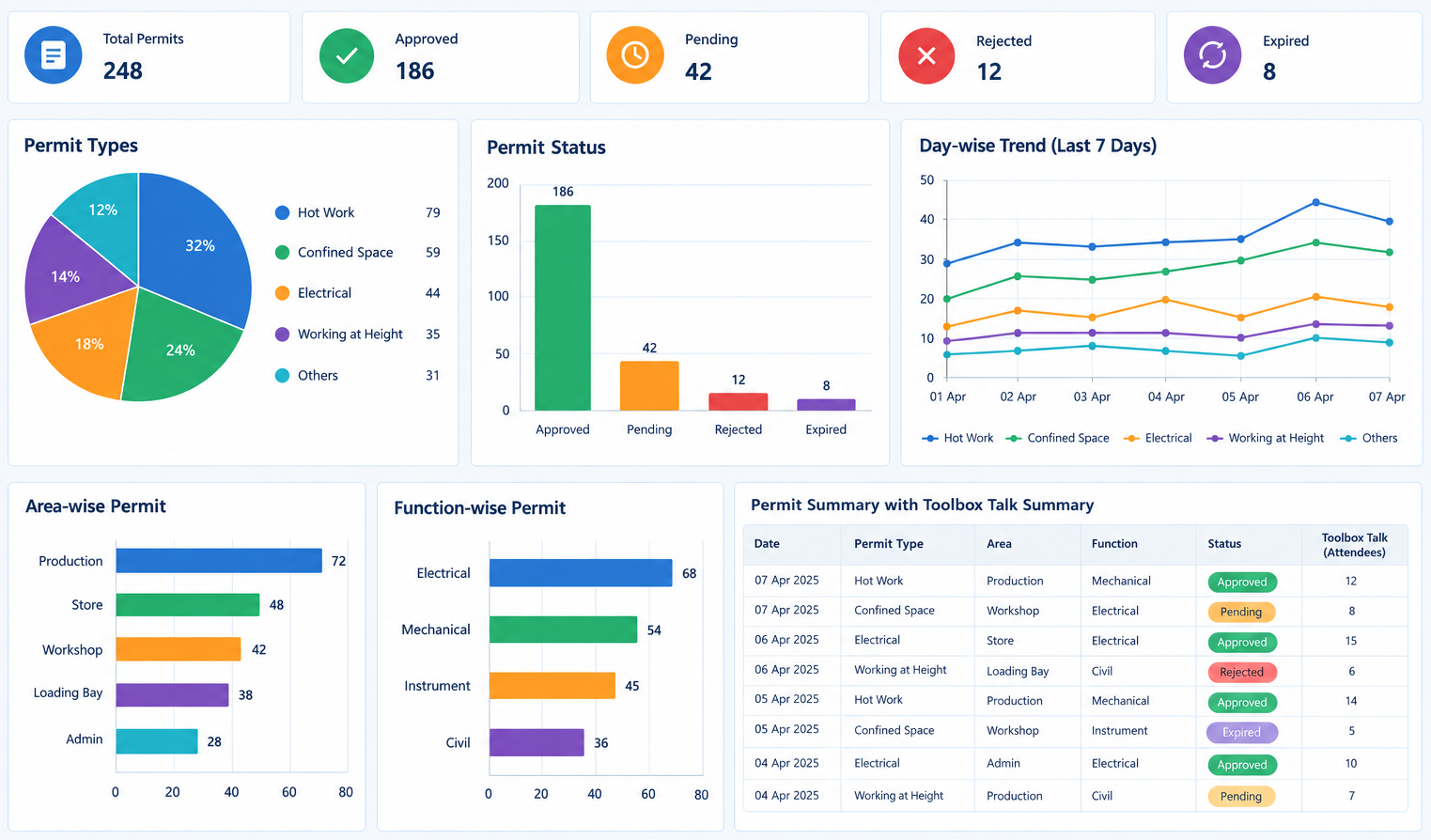
Contractor Performance Report
Evaluate contractor performance by monitoring permits issued, compliance, work completion, and safety records. Improve contractor accountability and support informed decision-making.
Toolbox Talk Report
Maintain digital records of toolbox talks, attendance, training topics, and participant acknowledgements. Track safety awareness activities and demonstrate compliance during audits.
Non-Compliance Report
Identify permit violations, overdue approvals, expired permits, and safety non-conformities through comprehensive reports. Take timely corrective actions to improve compliance and workplace safety.
Implement & Support by QHSEalert Permit To Work Software
System Configuration
Configure permit templates, approval workflows, user permissions, checklists, notifications, and custom business rules to match your organization’s Permit to Work procedures.
User Training
Provide training for administrators, supervisors, safety officers, employees, and contractors to ensure confident and effective use of the system.
Go-Live Support
Receive assistance during deployment to help users adapt quickly and ensure permit operations continue smoothly from day one.
Technical Support
Access dedicated technical support for troubleshooting, guidance, and assistance with system-related questions and operational issues.
Remote & Online Assistance
Get support through remote sessions, online meetings, email, and other digital communication channels for faster issue resolution.
Software Updates
Benefit from ongoing improvements, feature enhancements, and updates that help keep your PTW system aligned with evolving business and safety requirements.
Why Choose QHSEalert.com Safety Permit Software?
Comprehensive Permit Management
Manage the complete permit lifecycle digitally—from permit request and risk assessment to approval, issuance, extension, suspension, closure, and record retention—all from a single platform.
Configurable to Match Your Business Processes
Every organization has unique safety procedures. QHSEAlert allows you to configure permit types, approval workflows, checklists, mandatory fields, notifications, and authorization levels to align with your internal Permit to Work process.
Real-Time Visibility
Monitor permit status through centralized dashboards showing pending approvals, active permits, expired permits, suspended work, and completed permits, helping management make informed operational decisions.
Mobile-Friendly Access
Authorized users can review, approve, monitor, and close permits using mobile devices, enabling faster decision-making and improved communication across worksites.
Improve Safety and Regulatory Compliance
Ensure every permit includes required hazard identification, control measures, PPE requirements, approvals, and supporting documentation before hazardous work begins. Digital records also simplify internal audits and compliance verification.
Easy Implementation and User Adoption
The software is designed with an intuitive interface to help organizations implement digital Permit to Work processes efficiently while reducing the learning curve for employees and contractors.
Dedicated Support and Continuous Improvement
QHSEAlert provides implementation assistance, user training, technical support, and ongoing software enhancements to help organizations maximize the value of their digital Permit to Work system.
Designed for Modern High-Risk Industries
Whether you manage hundreds of permits each day or only a few critical work activities, QHSEAlert helps standardize permit processes, reduce paperwork, improve communication, and strengthen workplace safety through digital Permit to Work management.
QHSEAlert Safety Permit Software - Technical Information
| Attribute | Details |
|---|---|
| Software Name | QHSEAlert Safety Permit Software |
| Category | Permit to Work (PTW) Software |
| Software Type | Cloud-Based (SaaS) |
| Deployment | Web-Based Application |
| Primary Purpose | Digital Permit to Work Management |
| Mobile Access | Yes |
| Paperless Workflow | Yes |
| Unlimited Users | Yes |
| Unlimited Permits | Yes |
| Custom Permit Types | Yes |
| Approval Workflow | Configurable Multi-Level Workflow |
| Audit Trail | Complete Digital Audit Trail |
| Real-Time Dashboard | Yes |
| Reports & Analytics | Yes |
| Contractor Management | Yes |
| Risk Assessment Integration | Yes |
| Isolation & LOTO Management | Yes |
| Photo & Document Attachments | Yes |
| Role-Based Access Control | Yes |
| Multi-Site Support | Yes |
| Industry Support | Multiple Industries |
QHSEAlert Safety Permit Software - Security & Data Privacy
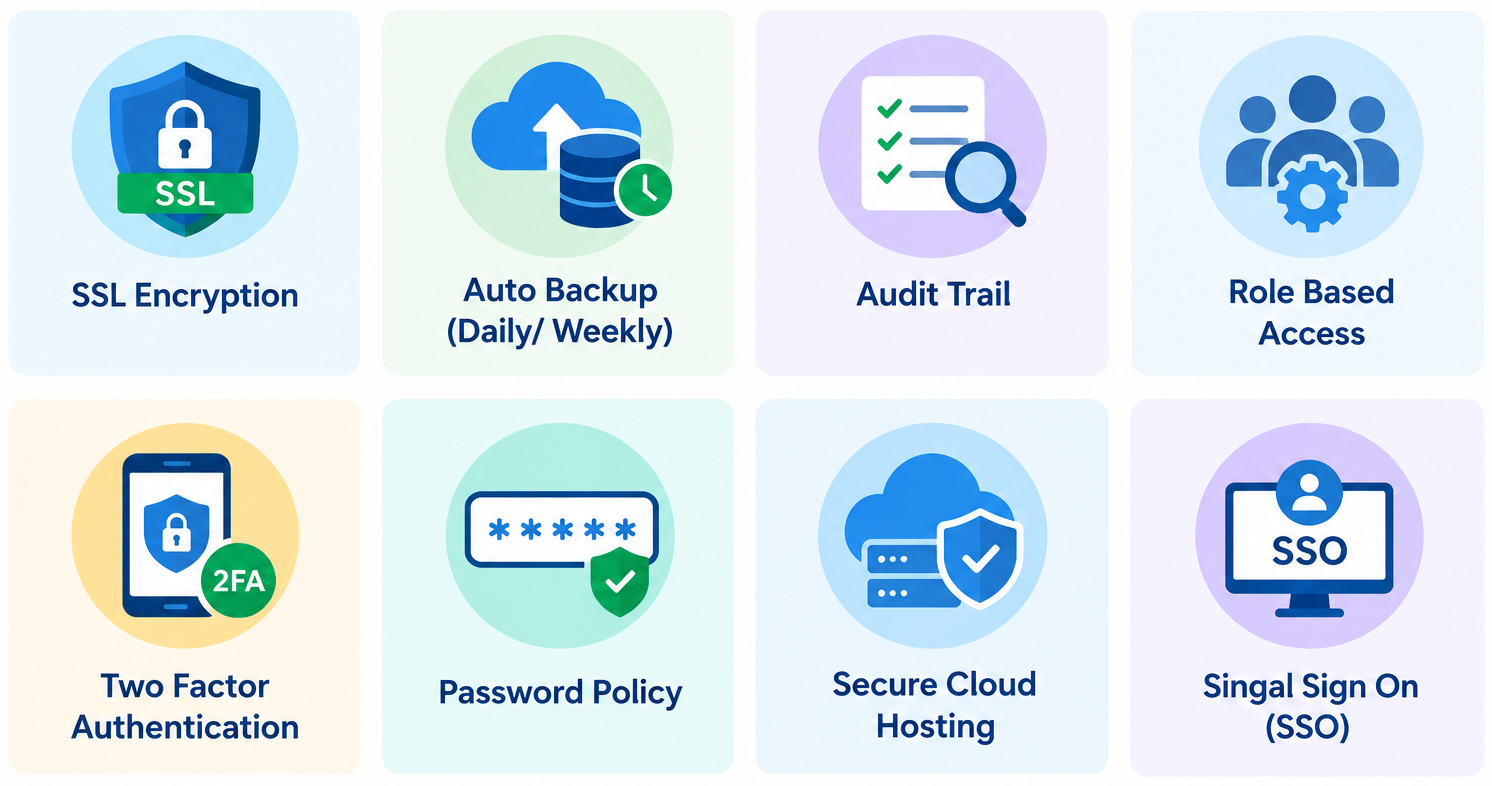
- ✔ SSL Encryption
- ✔ Auto Backup (Daily/Weekly)
- ✔ Audit Trail
- ✔ Role-Based Access
- ✔ Two-Factor Authentication
- ✔ Password Policy
- ✔ Secure Cloud Hosting
- ✔ Single Sign-On (SSO)
Frequently Asked Questions (FAQs)
What is Safety Permit to Work (PTW) Software?
- Safety Permit to Work (PTW) Software is a digital solution that helps organizations create, approve, issue, monitor, and close work permits electronically. It replaces paper-based permit systems with automated workflows, improving workplace safety, compliance, and operational efficiency.
Can the software be customized?
- Yes. QHSEAlert Safety Permit Software allows you to configure permit templates, approval workflows, user roles, checklists, mandatory fields, notifications, and custom permit types to match your company’s procedures.
Does the software support mobile devices?
- Yes. Users can create, review, approve, verify, and close permits using smartphones or tablets, allowing faster decision-making and improved collaboration from any work location.
Can I generate reports and dashboards?
- Yes. The software provides real-time dashboards, permit status reports, contractor performance reports, compliance reports, and toolbox talk reports to support informed decision-making.
Is there a limit on the number of users?
- No. QHSEAlert Safety Permit Software supports unlimited users, allowing organizations to add employees, contractors, supervisors, and administrators without user-based restrictions.
Which types of safety permits are supported?
- The software supports multiple permit types, including Hot Work, Confined Space Entry, Electrical Work, Lockout Tagout (LOTO), Excavation, Work at Height, Cold Work, Lifting, and fully customizable permit types based on your organization’s requirements.
Can contractors use the software?
- Yes. The organization can decide to extend the usage of the software to contractors with limited access that can be configured.
Does the software support Risk Assessment and LOTO?
- Yes. The software integrates Risk Assessment, Hazard Identification, Isolation Management, and Lockout Tagout (LOTO) with the permit workflow to ensure all safety controls are completed before work begins.
Which industries use Safety Permit Software?
- The software is widely used in Oil & Gas, Construction, Manufacturing, Chemical & Petrochemical, Mining, Power & Utilities, Cement, Pharmaceutical, Food & Beverage, Marine & Offshore, and other industries managing high-risk work.
How can I request a demo?
- You can contact our team to schedule a personalized product demonstration. QHSEAlert can help organizations understand how the Safety Permit Software can be configured to meet their specific safety and operational requirements.
QHSE Digital Solutions