
Hazard Reporting and Compliance Software
Identify Hazards. Report Risks. Strengthen Workplace Safety Compliance.
QHSEalert Hazard Reporting and Compliance Software helps organizations identify workplace hazards, report unsafe conditions, assess risks, and manage corrective actions through a centralized digital platform. Replace paper-based hazard reporting with a structured, traceable, and data-driven hazard management system.
From hazard identification and risk assessment to corrective action implementation and compliance monitoring, QHSEalert enables organizations to improve workplace safety, strengthen operational control, and promote proactive hazard management.
Digitalize your QHSE system with QHSEalert Hazard Reporting and Compliance Software.
What Is Hazard Reporting and Compliance Software?
Hazard Reporting and Compliance Software is a digital solution designed to identify, record, assess, monitor, and control workplace hazards that may affect employees, contractors, visitors, equipment, or the environment.
The software enables employees and authorized personnel to report hazards, unsafe conditions, hazardous activities, and potential non-compliance through a centralized reporting system. Each report can be reviewed, risk-classified, assigned to a responsible person, and tracked until the required corrective action is completed.
QHSEalert provides a systematic approach to hazard reporting and compliance management by connecting hazard identification, risk assessment, corrective action management, and performance monitoring in one integrated platform.
Why Do Organizations Need Hazard Reporting Software?
Workplace hazards can arise from unsafe equipment, hazardous substances, inadequate procedures, unsafe working conditions, maintenance activities, contractor operations, and changing operational environments.
When hazard reporting depends on paper forms, verbal communication, or disconnected spreadsheets, important information may be delayed, overlooked, or lost.
A digital hazard reporting system helps organizations establish a consistent reporting process, improve employee participation, and ensure that identified hazards receive appropriate attention.
Key challenges addressed by Hazard Reporting and Compliance Software include:
- Delayed reporting of workplace hazards and unsafe conditions.
- Lack of visibility into unresolved or high-risk hazards.
- Difficulty assigning responsibility for corrective actions.
- Inconsistent hazard risk assessment and prioritization.
- Limited tracking of corrective action deadlines.
- Difficulty maintaining hazard reporting records and compliance evidence.
- Lack of centralized hazard performance data.
- Repeated hazards due to ineffective corrective actions.
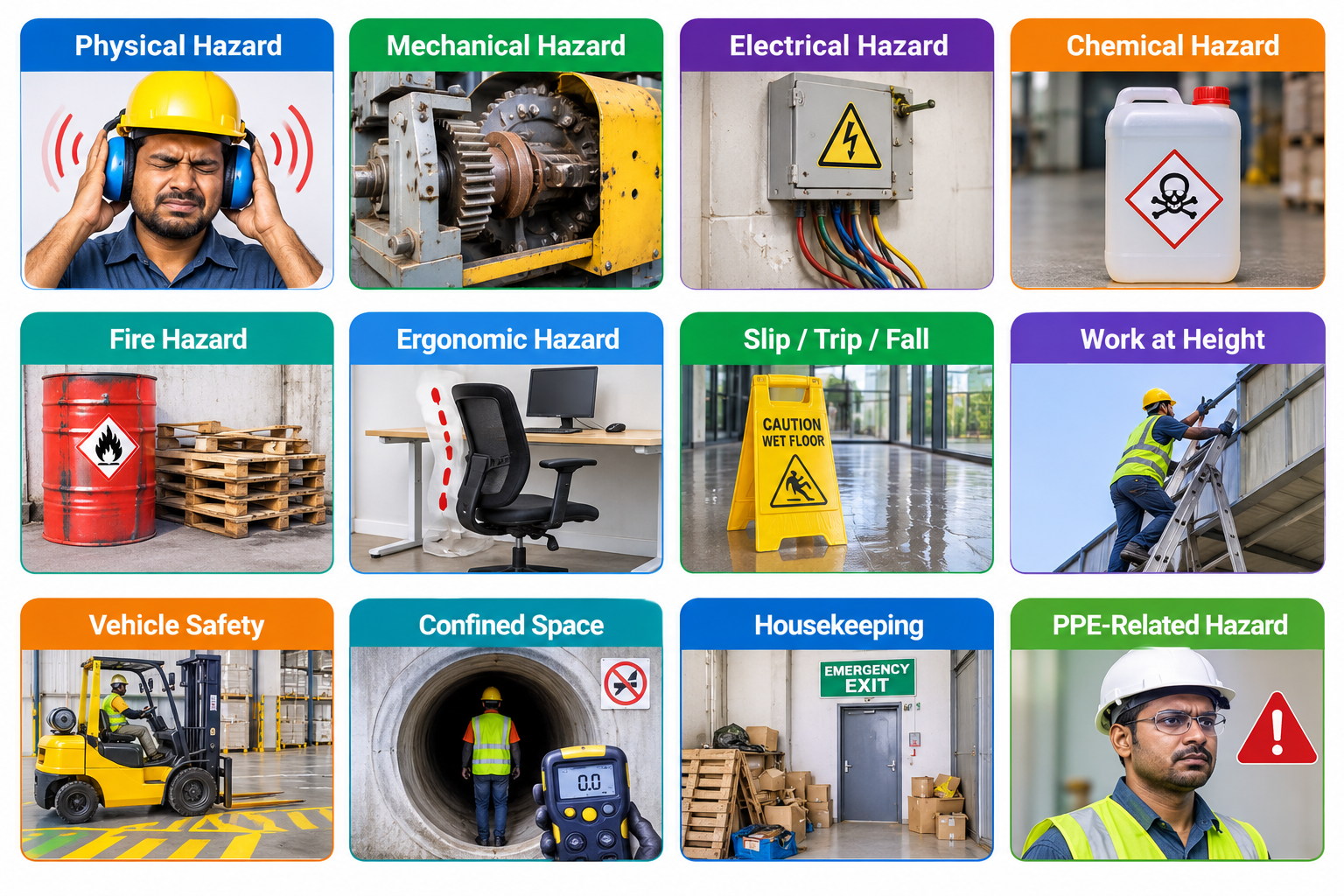
Types of Hazards with examples
| Category | Example of Hazard Observation |
|---|---|
| Physical Hazard | Excessive noise in the production area |
| Mechanical Hazard | Missing machine guard |
| Electrical Hazard | Exposed electrical conductor |
| Chemical Hazard | Unlabelled chemical container |
| Fire Hazard | Flammable material stored near a heat source |
| Ergonomic Hazard | Improper workstation arrangement |
| Slip / Trip / Fall | Water accumulation near the entrance |
| Work at Height | Worker using an unsecured ladder |
| Vehicle Safety | Forklift operating in a pedestrian walkway |
| Confined Space | Gas testing not performed before entry |
| Environmental Hazard | Oil leakage from equipment |
| Housekeeping | Materials obstructing an emergency exit |
| PPE-Related Hazard | Worker not wearing required eye protection |
| Unsafe Condition | Damaged electrical cable lying on the floor |
| Unsafe Act | Worker operating machinery without authorization |
Challenges of a Paper-Based Hazard Reporting Program
⏳ Delayed Hazard Reporting
Employees may delay reporting hazards because they need to locate a reporting form, complete it manually, and submit it to the concerned supervisor. This delay can prevent organizations from taking timely action and may allow unsafe conditions to remain unaddressed.
📄 Lost or Incomplete Hazard Records
Paper forms can be misplaced, damaged, or submitted with missing information. Incomplete hazard descriptions, photographs, location details, or other important information can make investigation and risk evaluation difficult.
👁️ Limited Visibility of Workplace Hazards
Hazard reports are often maintained separately by departments, locations, or individual supervisors. Management may not have a consolidated view of reported hazards, recurring unsafe conditions, or high-risk areas across the organization.
📌 Difficult Corrective Action Tracking
Tracking corrective actions through paper forms and manual registers can be time-consuming. Safety teams may find it difficult to monitor action owners, target completion dates, pending activities, and overdue corrective actions.
📢 Slow Communication and Escalation
Sharing hazard information through physical documents can delay communication between employees, supervisors, safety officers, and management. Critical hazards may not reach the responsible personnel quickly enough for timely intervention.
⌨️ Manual Data Entry and Reporting
Safety teams often need to transfer information from paper forms into spreadsheets or management reports. This creates duplicate work, increases administrative effort, and introduces the possibility of data-entry errors.
📊 Limited Hazard Trend Analysis
Identifying frequently reported hazards, recurring unsafe conditions, and high-risk locations requires manual review of records. This makes it difficult to identify patterns, prioritize preventive measures, and make data-driven safety decisions.
🔄 Inconsistent Reporting Practices
Different departments, facilities, and shifts may follow different reporting formats and hazard classification methods. Inconsistent reporting can affect data quality and make it difficult to compare safety performance across the organization.
🔗 Weak Audit Trail and Accountability
Maintaining a reliable history of hazard reports, reviews, approvals, corrective actions, and closure verification can be challenging with paper records. It may be difficult to establish who reported a hazard, who was responsible for action, and when the issue was resolved.
🏭 Difficult Management Across Multiple Sites
Organizations operating across multiple plants, facilities, warehouses, or project locations may struggle to collect and consolidate paper-based hazard reports. Management may not have timely access to the latest information from every location.
🤝 Reduced Employee Participation
A lengthy and inconvenient reporting process may discourage employees and contractors from reporting hazards, unsafe acts, and unsafe conditions. This can result in missed opportunities for early hazard identification and preventive action.
💰 Higher Administrative and Storage Costs
Printing forms, distributing documents, collecting completed reports, maintaining registers, and storing physical records require time, effort, and resources. Retrieving historical records during audits or management reviews can also be difficult.
Why Organizations Need Digital Safety Observation Management Software?
Organizations need an effective way to identify workplace hazards, report unsafe conditions, assess risks, and ensure that corrective actions are completed on time. Manual reporting methods can create delays, inconsistent records, and limited visibility of safety issues across departments and sites.
Digital Hazard Reporting & Compliance Management Software helps organizations establish a structured process for capturing hazards, assigning responsibilities, monitoring corrective actions, and maintaining accessible safety records. By digitizing hazard management, organizations can improve communication, strengthen accountability, and support proactive risk reduction.
Transform Hazard Reporting into Proactive Risk Management
Effective hazard management is more than collecting reports. Organizations need to ensure that hazards are reviewed, risks are evaluated, corrective actions are implemented, and completed actions are verified.
QHSEalert Hazard Reporting & Compliance Management Software supports a structured digital approach to hazard identification, reporting, risk assessment, corrective action tracking, and safety performance monitoring. It helps organizations improve hazard visibility, strengthen accountability, and support continuous improvement in workplace safety.
⚡ Enable Faster Hazard Reporting
👁️ Improve Hazard Visibility Across the Organization
✅ Strengthen Corrective Action Management
⚠️ Support Risk-Based Prioritization
📢 Improve Communication and Escalation
🗂️ Maintain Centralized and Traceable Records
📊 Identify Recurring Hazards and Safety Trends
🏭 Standardize Hazard Reporting Across Sites
🤝 Encourage Employee and Contractor Participation
📋 Support Compliance and Audit Readiness
⚙️ Reduce Manual Administrative Work
📈 Enable Data-Driven Safety Improvement
How Hazard Reporting and Compliance Software Works?
1. 🔍 Identify Workplace Hazards
Employees, contractors, supervisors, and other authorized personnel identify potential hazards during routine activities, inspections, maintenance, operations, or workplace observations.
2. 📝 Record and Report Hazards
Users record hazard details, including the location, department, activity, hazard description, potential consequences, and supporting photographs or other evidence where available.
3. ⚠️ Assess Hazard Risk
The reported hazard is evaluated according to the organization’s defined risk assessment methodology. Risk classification helps determine the priority of the hazard and the level of attention required.
4. 📌 Assign Corrective Actions
The responsible department or authorized person reviews the hazard and assigns appropriate actions to eliminate the hazard, reduce the risk, or establish effective controls.

5. 📊 Track Implementation
Assigned personnel implement the required actions within the defined timeline. Responsible managers can monitor action status, pending tasks, and overdue corrective actions.
6. ✅ Verify and Close
The completed action is reviewed to determine whether the intended control has been implemented effectively. The hazard report can then be closed according to the organization’s established procedure.
7. 📈 Analyze and Improve
Hazard reports and corrective action records can be analyzed to identify recurring hazards, high-risk activities, common causes, and opportunities for continuous improvement.
Key Features of Hazard Reporting and Compliance Software
📝 Digital Hazard Reporting
Enable employees and authorized personnel to report workplace hazards through a structured digital reporting system. Capture relevant hazard information, supporting evidence, and reporting details in a centralized database.
🔍 Hazard Identification and Classification
Classify reported hazards according to defined categories, such as physical, chemical, biological, ergonomic, electrical, mechanical, environmental, and process-related hazards.
⚠️ Hazard Risk Assessment
Evaluate hazards based on defined risk assessment criteria, such as severity, likelihood, and risk level. Prioritize hazards requiring immediate attention and appropriate risk control measures.
✅ Corrective and Preventive Action Management
Assign corrective actions to responsible personnel, establish target completion dates, monitor progress, and maintain records of action implementation through hazard corrective action management.
📋 Hazard Compliance Monitoring
Monitor reported hazards and associated corrective actions against internal safety procedures, applicable legal requirements, and organizational compliance criteria. Support a structured approach to safety compliance reporting and follow-up.
📱 Mobile Hazard Reporting
Enable field personnel to access the hazard reporting system through supported mobile devices, allowing reporting closer to the point where hazards are identified.
📸 Photograph and Evidence Management
Support the recording of hazard-related evidence, such as photographs, documents, and action completion records, where enabled by the configured reporting workflow.
📊 Real-Time Hazard Tracking
Monitor hazard reports, assigned responsibilities, pending actions, overdue tasks, and closure status through a centralized system.
📈 Hazard Dashboard and Analytics
Analyze hazard reporting performance through dashboards and reports. Identify recurring hazards, high-risk areas, reporting trends, and opportunities for improving workplace safety.
🔗 Audit Trail and Traceability
Maintain traceable records of hazard reports, assigned actions, and relevant status changes to support internal reviews, investigations, and compliance verification.
Benefits of Hazard Reporting and Compliance Software
🔍 Improve Workplace Hazard Identification
Encourage employees and contractors to report hazards before they result in injuries, incidents, equipment damage, or operational disruptions.
⚠️ Strengthen Risk-Based Decision Making
Prioritize hazards according to their assessed risk levels and support timely implementation of appropriate controls.
✅ Improve Corrective Action Accountability
Assign clear responsibilities, monitor action completion, and maintain visibility into unresolved hazards through structured hazard corrective action management.
📋 Strengthen Safety Compliance Monitoring
Maintain organized hazard reporting and corrective action records to support compliance monitoring, internal audits, and management reviews.
⚙️ Reduce Administrative Work
Replace disconnected paper-based reporting and manual registers with a centralized digital workflow.
📈 Improve Safety Performance
Use hazard data to identify recurring problems, evaluate reporting trends, and support continuous improvement initiatives.
🤝 Promote Employee Participation
Provide a structured mechanism for employees and contractors to contribute to hazard identification and workplace safety improvement.
Hazard Reporting and Compliance Software for Different Industries

✔ Oil & Gas
✔ Construction
✔ Manufacturing
✔ Chemical & Petrochemical
✔ Mining
✔ Power & Utilities
✔ Cement Industry
✔ Pharmaceutical
✔ Food & Beverage
✔ Marine & Offshore
✔ Infrastructure & Utilities
Hazard Reporting Software vs. Paper-Based Reporting
| Attribute | Paper-Based Reporting | QHSEalert Digital System |
|---|---|---|
| Hazard Reporting | Manual forms and registers | Digital hazard reporting |
| Accessibility | Physical documents | Web and supported mobile access |
| Report Submission | Manual communication | Centralized digital submission |
| Risk Classification | Manual assessment | Configurable digital classification |
| Action Assignment | Manual follow-up | Structured responsibility assignment |
| Action Tracking | Registers and spreadsheets | Centralized status tracking |
| Overdue Actions | Manual monitoring | Dashboard-based monitoring |
| Hazard Records | Paper files | Centralized digital records |
| Data Analysis | Manual compilation | Digital reports and analytics |
| Traceability | Manual documentation | Traceable digital records |
| Compliance Evidence | Scattered documents | Centralized reporting records |
| Continuous Improvement | Manual review | Data-driven hazard analysis |
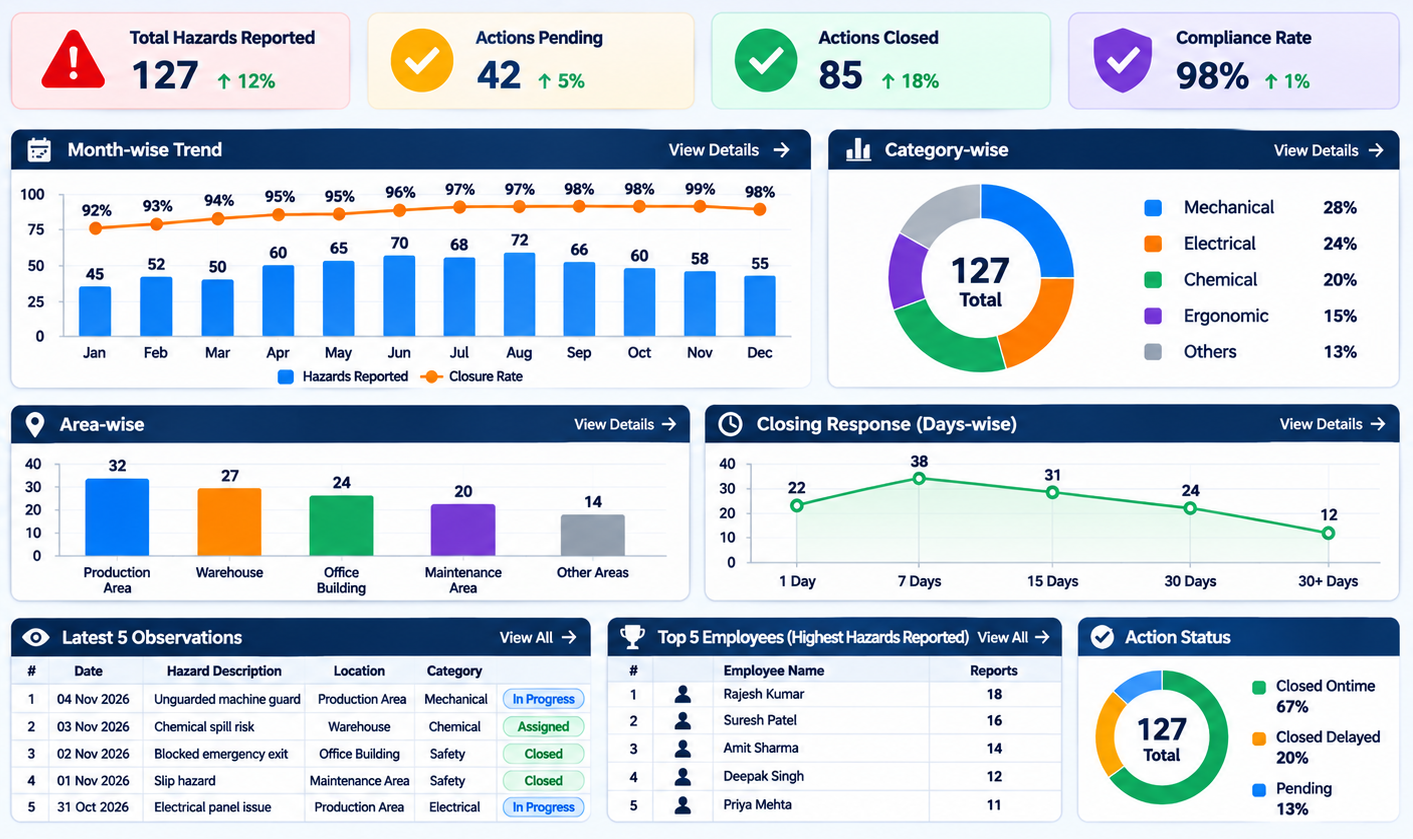
Safety Observation Dashboard & Analytics
QHSEalert Hazard Reporting and Compliance Software provides management with real-time visibility into workplace hazards, unsafe conditions, unsafe acts, risk levels, and corrective action performance. It helps organizations identify recurring issues, monitor compliance, improve workplace safety, and build a proactive safety culture.
The QHSEalert dashboard can provide management visibility into key performance indicators such as:
- Total Hazards Reported
- Hazard Category-wise Analysis
- Area / Department-wise Hazards
- Month-wise Performance
- Closing Response (Days-wise)
- Action Status
- User-wise Reporting
- Severity-wise Classification
- Unsafe Act vs. Unsafe Condition
- Latest 5 Observations
- Top 5 Hazard Reporters
- Corrective Action Monitoring
Implementation & Support
⚙️ Configuration
Configure observation categories, forms, workflows, users, departments, locations, and other requirements.
👥 User Mapping
Map users according to their responsibilities for reporting, reviewing, assigning, approving, and closing observations.
🎓 Training
Provide user training so employees, supervisors, and administrators can effectively use the system.
📖 User Manual
Provide guidance for users and administrators.
💻 Demo Environment
Provide a demonstration environment to familiarize users with the system.
🛠️ Post-Implementation Support
Support users after implementation through the available support mechanism.
Why Choose QHSEalert Hazard Reporting and Compliance Software?
QHSEalert provides a centralized digital approach to hazard reporting, corrective action management, and safety performance monitoring.
The platform helps organizations move from reactive hazard management toward a proactive approach based on reporting, risk assessment, accountability, and continuous improvement.
With digital reporting, centralized records, and structured follow-up, organizations can improve visibility into workplace hazards and support more effective QHSE management.
One Platform. Complete Control.
Digitalize your QHSE system with QHSEalert.
Hazard Reporting and Compliance Software Technical Specifications
| Attribute | Details |
|---|---|
| Software Name | Hazard Reporting and Compliance Software |
| Software Type | Cloud-Based SaaS |
| Deployment | Web-Based Application |
| Primary Purpose | Digital Identification, Reporting, Risk Assessment, Tracking, and Closure of Workplace Hazards |
| Reporting Method | Digital Hazard Reporting |
| Hazard Classification | Configurable Hazard Categories |
| Risk Assessment | Defined Risk Assessment Criteria |
| Corrective Action Management | Responsibility Assignment, Tracking, and Closure |
| Compliance Monitoring | Hazard and Corrective Action Compliance Tracking |
| Mobile Access | Supported Mobile Devices |
| User Management | Role-Based Access Control |
| Contractor Management | Contractor Access and Reporting, Where Configured |
| Dashboard | Hazard Reporting and Action Status Monitoring |
| Reporting and Analytics | Hazard Trends, Risk Classification, and Action Status |
| Record Management | Centralized Digital Hazard Records |
| Audit Trail | Traceable Digital Records |
| Data Export | Supported Reporting and Export Functions |
| User Capacity | Scalable User Management |
| Notifications | Configurable Notifications, Where Enabled |
| Customization | Configurable Reporting Fields and Workflows |
| Data Backup | Platform-Based Backup Facilities |
| Application Access | Authorized Web and Mobile Access |
QHSEalert Hazard Reporting & Compliance Management Software - Security & Data Privacy
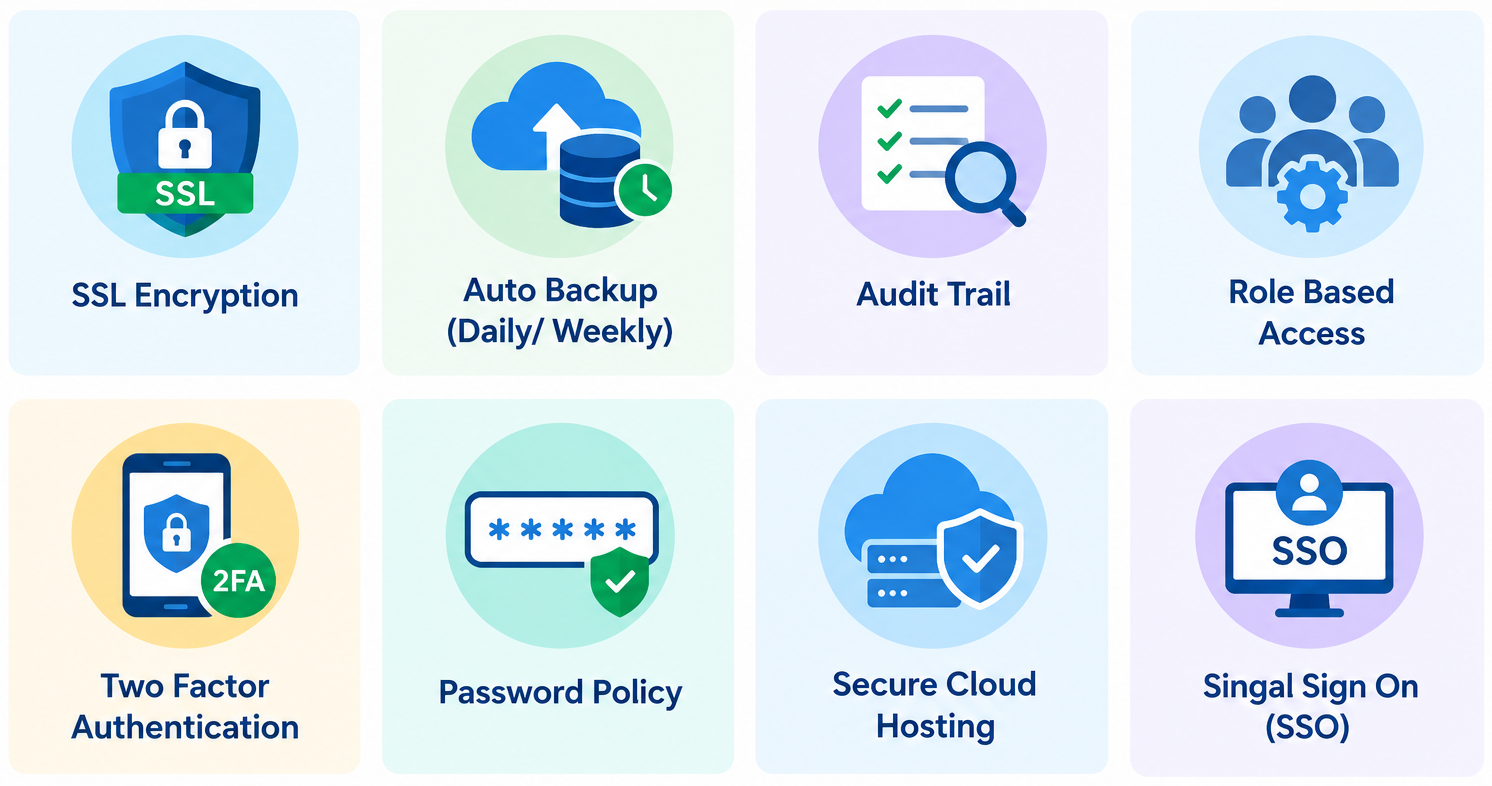
- ✔ SSL Encryption
- ✔ Auto Backup (Daily/Weekly)
- ✔ Audit Trail
- ✔ Role-Based Access
- ✔ Two-Factor Authentication
- ✔ Password Policy
- ✔ Secure Cloud Hosting
- ✔ Single Sign-On (SSO)
Frequently Asked Questions About Hazard Reporting & Compliance Management Software
1. What is Hazard Reporting and Compliance Software?
- Hazard Reporting and Compliance Software is a digital system used to identify, record, assess, and manage workplace hazards. It enables employees to report unsafe conditions, supports risk classification, and helps organizations assign corrective actions and monitor their implementation. The software also provides centralized hazard records and reporting information to support workplace safety improvement and compliance monitoring.
2. How does hazard reporting software improve workplace safety?
- Hazard Reporting Software improves workplace safety by enabling employees and contractors to report hazards through a structured digital process. Reported hazards can be assessed, prioritized, and assigned to responsible personnel for corrective action. This improves visibility into unresolved hazards, supports timely risk control, and helps organizations identify recurring safety problems before they lead to incidents or injuries.
3. What is the difference between hazard reporting and safety observation software?
- Hazard Reporting Software focuses on identifying and managing workplace hazards, unsafe conditions, and potential risks. Safety observation software generally focuses on recording workplace observations, including safe and unsafe behaviours and conditions. Both systems can support corrective action management. Hazard reporting places greater emphasis on hazard identification, risk assessment, and hazard control.
4. Can employees report hazards using mobile devices?
- Yes. QHSEalert supports access through supported mobile devices, allowing authorized personnel to report hazards from their workplace. Digital reporting can help capture hazard descriptions, relevant locations, and supporting information, depending on the configured reporting workflow. Mobile access enables employees to participate in hazard identification without depending entirely on paper-based reporting methods.
5. Can hazard reports be assigned to responsible persons?
- Yes. Hazard reports can be reviewed and assigned to responsible personnel for appropriate action. The assigned person can implement the required corrective measures, while authorized users monitor the action status and completion. This structured process improves accountability and helps organizations maintain visibility into pending, completed, and overdue hazard-related actions.
6. Does hazard reporting software support ISO 45001?
- Hazard Reporting Software can support organizations implementing an ISO 45001 occupational health and safety management system. It can help maintain hazard identification records, support risk assessment, track corrective actions, and provide information for monitoring workplace safety performance. However, software alone does not establish ISO 45001 conformity or guarantee certification. Organizations must implement all applicable management system requirements.
7. Can organizations monitor hazard reporting performance?
- Yes. A digital hazard reporting system enables organizations to monitor hazard reports, risk classifications, corrective action status, and reporting trends through available dashboards and reports. This information can help management identify recurring hazards, prioritize improvement activities, and evaluate the effectiveness of workplace hazard management processes.
8. Is QHSEalert Hazard Reporting and Compliance Software suitable for multiple industries?
- QHSEalert Hazard Reporting and Compliance Software can support hazard reporting and compliance monitoring across manufacturing, construction, chemical processing, oil and gas, mining, logistics, laboratories, and other industrial environments. Organizations can configure hazard categories, reporting fields, and workflows according to their operational requirements, risk assessment methodology, and applicable compliance obligations.
9. Can hazard reporting software replace paper-based hazard registers?
- A digital hazard reporting system can replace many manual hazard reporting forms and registers by maintaining centralized electronic records. Digital reporting improves accessibility, traceability, and action tracking. The extent of paperless implementation depends on organizational procedures, legal recordkeeping requirements, and the reporting workflows configured within the software.
10. How can I request a demo of QHSEalert Hazard Reporting and Compliance Software?
- Organizations interested in digitalizing their hazard reporting and compliance management processes can contact QHSEalert to request a software demonstration. The demo can help explain hazard reporting workflows, risk classification, corrective action tracking, dashboard reporting, and other relevant capabilities according to organizational requirements.